48. SQL Server 
48.1. SQL Server Version Support
The driver enables connectivity to SQL Server through the TDS protocol. SQL Server versions 2008, 2012, 2014, 2016, and 2019 are supported.
Connections to Azure SQL Server and Azure Data Warehouse instances are supported as well.
48.2. Connection Options
48.2.1. Authentication
Property | Description |
AuthScheme | The scheme used for authentication. Accepted entries are Password, NTLM, Kerberos, AzurePassword, AzureAD, AzureMSI, AzureServicePrincipal. |
Server | The name of the server running SQL Server. |
Port | The port of the MS SQL Server. |
Database | The name of the SQL Server database. |
User | The SQL Server user account used to authenticate. |
Password | The password used to authenticate the user. |
Domain | The name of the domain for a Windows (NTLM) security login. |
IntegratedSecurity | Whether or not to authenticate with Windows Integrated Security. |
NTLMVersion | The NTLM version. |
Encrypt | This field sets whether SSL is enabled. |
48.2.2. Azure Authentication
Property | Description |
AzureTenant | The Microsoft Online tenant being used to access data. If not specified, your default tentant will be used. |
48.2.3. OAuth
Property | Description |
InitiateOAuth | Set this property to initiate the process to obtain or refresh the OAuth access token when you connect. |
OAuthClientId | The client ID assigned when you register your application with an OAuth authorization server. |
OAuthClientSecret | The client secret assigned when you register your application with an OAuth authorization server. |
CallbackURL | The OAuth callback URL to return to when authenticating. This value must match the callback URL you specify in your app settings. |
OAuthGrantType | The grant type for the OAuth flow. |
OAuthVerifier | The verifier code returned from the OAuth authorization URL. |
48.2.4. Kerberos
Property | Description |
KerberosKDC | The Kerberos Key Distribution Center (KDC) service used to authenticate the user. |
KerberosRealm | The Kerberos Realm used to authenticate the user with. |
KerberosSPN | The service principal name (SPN) for the Kerberos Domain Controller. |
KerberosKeytabFile | The Keytab file containing your pairs of Kerberos principals and encrypted keys. |
KerberosServiceRealm | The Kerberos realm of the service. |
KerberosServiceKDC | The Kerberos KDC of the service. |
KerberosTicketCache | The full file path to an MIT Kerberos credential cache file. |
48.2.5. SSL
Property | Description |
SSLClientCert | The TLS/SSL client certificate store for SSL Client Authentication (2-way SSL). |
SSLClientCertType | The type of key store containing the TLS/SSL client certificate. |
SSLClientCertPassword | The password for the TLS/SSL client certificate. |
SSLClientCertSubject | The subject of the TLS/SSL client certificate. |
SSLServerCert | The certificate to be accepted from the server when connecting using TLS/SSL. |
48.2.6. SSH
Property | Description |
SSHAuthMode | The authentication method to be used to log on to an SFTP server. |
SSHClientCert | A certificate to be used for authenticating the user. |
SSHClientCertPassword | The password of the SSHClientCert certificate if it has one. |
SSHClientCertSubject | The subject of the SSH client certificate. |
SSHClientCertType | The type of SSHClientCert certificate. |
SSHServer | The SSH server. |
SSHPort | The SSH port. |
SSHUser | The SSH user. |
SSHPassword | The SSH password. |
SSHServerFingerprint | The SSH server fingerprint. |
UseSSH | Whether to tunnel the SQL Server connection over SSH. Use SSH. |
48.2.7. Firewall
Property | Description |
FirewallType | The protocol used by a proxy-based firewall. |
FirewallServer | The name or IP address of a proxy-based firewall. |
FirewallPort | The TCP port for a proxy-based firewall. |
FirewallUser | The user name to use to authenticate with a proxy-based firewall. |
FirewallPassword | A password used to authenticate to a proxy-based firewall. |
48.2.8. Proxy
Property | Description |
ProxyAutoDetect | This indicates whether to use the system proxy settings or not. This takes precedence over other proxy settings, so you'll need to set ProxyAutoDetect to FALSE in order use custom proxy settings. |
ProxyServer | The hostname or IP address of a proxy to route HTTP traffic through. |
ProxyPort | The TCP port the ProxyServer proxy is running on. |
ProxyAuthScheme | The authentication type to use to authenticate to the ProxyServer proxy. |
ProxyUser | A user name to be used to authenticate to the ProxyServer proxy. |
ProxyPassword | A password to be used to authenticate to the ProxyServer proxy. |
ProxySSLType | The SSL type to use when connecting to the ProxyServer proxy. |
ProxyExceptions | A semicolon separated list of destination hostnames or IPs that are exempt from connecting through the ProxyServer . |
48.2.9. Logging
Property | Description |
Logfile | A filepath which designates the name and location of the log file. |
Verbosity | The verbosity level that determines the amount of detail included in the log file. |
LogModules | Core modules to be included in the log file. |
MaxLogFileSize | A string specifying the maximum size in bytes for a log file (for example, 10 MB). |
MaxLogFileCount | A string specifying the maximum file count of log files. |
48.2.10. Schema
Property | Description |
Location | A path to the directory that contains the schema files defining tables, views, and stored procedures. |
BrowsableSchemas | This property restricts the schemas reported to a subset of the available schemas. For example, BrowsableSchemas=SchemaA,SchemaB,SchemaC. |
Tables | This property restricts the tables reported to a subset of the available tables. For example, Tables=TableA,TableB,TableC. |
Views | Restricts the views reported to a subset of the available tables. For example, Views=ViewA,ViewB,ViewC. |
48.2.11. Miscellaneous
Property | Description |
ApplicationIntent | The application intent connection string property expresses the client application's request to be directed either to a read-write or read-only version of an availability group database. To use read-only routing, a client must use an application intent of read-only in the connection string when connecting to the availability group listener. Without the read-only application intent, connections to the availability group listener are directed to the database on the primary replica. |
ApplicationName | The application name connection string property expresses the HTTP User-Agent. |
DefaultDomain | This property is used for the Oracle Database Gateway for ODBC. |
EnableForeignKeyDetection | Whether to detect the foreign keys in ODBC. |
IncludeDualTable | Set this property to mock the Oracle DUAL table for better compatibility with Oracle database. |
LimitKeySize | The maximum length of a primary key column. |
MapBigintToVarchar | This property controls whether or not the bigint type maps to SQL_VARCHAR instead of SQL_BIGINT. This property is false by default. |
MapToInt | This property controls whether or not the long type maps to SQL_INTEGER instead of SQL_BIGINT. This property is false by default. |
MapToLongVarchar | This property controls whether or not a column is returned as SQL_LONGVARCHAR. |
MapToWVarchar | This property controls whether or not string types map to SQL_WVARCHAR instead of SQL_VARCHAR. This property is set by default. |
MaximumColumnSize | The maximum column size. |
MaxRows | Limits the number of rows returned rows when no aggregation or group by is used in the query. This helps avoid performance issues at design time. |
Other | These hidden properties are used only in specific use cases. |
QueryPassthrough | This option passes the query to the SQL Server server as is. |
Readonly | You can use this property to enforce read-only access to SQL Server from the provider. |
RTK | The runtime key used for licensing. |
Timeout | A timeout for the provider. |
UpperCaseIdentifiers | This property reports all identifiers in uppercase. This is the default for Oracle databases and thus allows better integration with Oracle tools such as the Oracle Database Gateway. |
48.3. Description Extraction
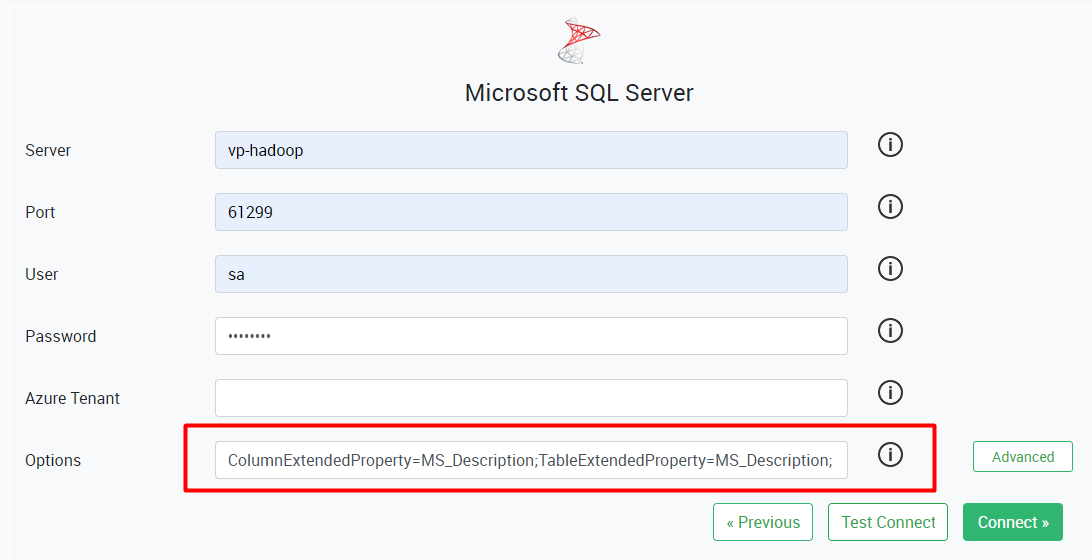
To extract table and column descriptions for SQL Server, you must add the following parameters in the Options field of HOPEX Data Discovery:
ColumnExtendedProperty=MS_Description;
TableExtendedProperty=MS_Description;