26. IBM DB2 for z/OS
26.1. Prerequisite
1. Download the Db2 for z/OS driver: https://www.ibm.com/support/pages/db2-jdbc-driver-versions-and-downloads.
2. Place the Db2 for z/OS driver in a directory accessible from the HOPEX Data Discovery Module, but not in the module directory.
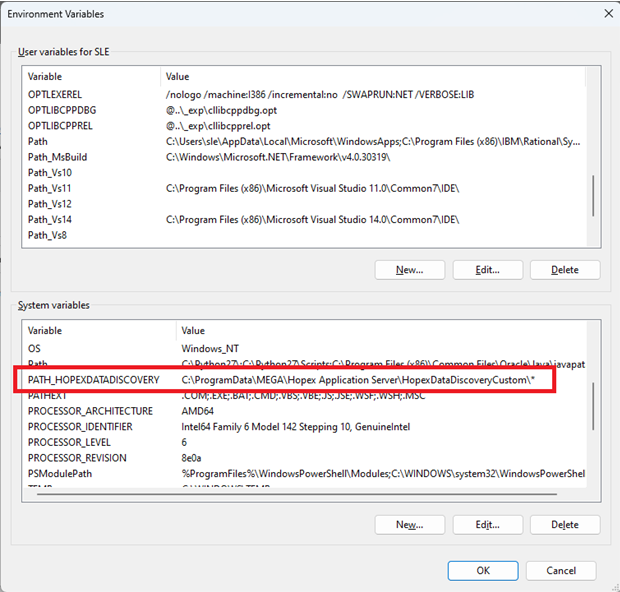
Example: "C:\ProgramData\MEGA\Hopex Application Server\HopexDataDiscoveryCustom"
3. Create the environment variable "PATH_HOPEXDATADISCOVERY" if it doesn't already exist and set it to the directory mentioned in step 2.
26.2. Connection Options
|
Property
|
Description
|
|
Database
|
A name for the data source. It's the Db2 location name that is defined during installation.
All characters in the Db2 location name must be uppercase characters. |
|
Server
|
The domain name or IP address of the data source
|
|
Port
|
The TCP/IP server port number that is assigned to the data source.
This is an integer between 0 and 65535. |
|
User
|
The user name for the connection
|
|
Password
|
The user's password for the connection.
|
|
DBNAME
|
For a table, or a view of tables, the name of the database that contains the table space that is named in TSNAME. For a created temporary table, an alias, or a view of a view, the value is DSNDB06.
|
|
specialRegisters
|
A list of special register settings for the JDBC connection. You can specify one or more special register name and value pairs. Special register name and value pairs must be delimited by commas (,).
|
|
globalSessionVariables
|
A list of session variable settings for the JDBC connection. You can specify one or more session variable name and value pairs.
Session variable settings apply only to Db2 for z/OS Version 11 or later data servers. Session variable name and value pairs must be delimited by commas (,). The last pair must end with a semicolon (;). |
|
queryAcceleration
|
Changes the value of the CURRENT QUERY ACCELERATION special register.
Possible values are: NONE : Specifies that no query acceleration is done. ENABLE : Specifies that queries are accelerated only if Db2 determines that it is advantageous to do so. If there is an accelerator failure while a query is running, or the accelerator returns an error, Db2 returns a negative SQLCODE to the application. ENABLE WITH FAILBACK : Specifies that queries are accelerated only if Db2 determines that it is advantageous to do so. If the accelerator returns an error during the PREPARE or first OPEN for the query, Db2 executes the query without the accelerator. If the accelerator returns an error during a FETCH or a subsequent OPEN, Db2 returns the error to the user, and does not execute the query. ELIGIBLE : Specifies that queries are accelerated if they are eligible for acceleration. Db2 does not use cost information to determine whether to accelerate the queries. Queries that are not eligible for acceleration are executed by Db2. If there is an accelerator failure while a query is running, or the accelerator returns an error, Db2 returns a negative SQLCODE to the application. ALL : Specifies that queries are accelerated if they are eligible for acceleration. Db2 does not use cost information to determine whether to accelerate the queries. Queries that are not eligible for acceleration are not executed by Db2, and an SQL error is returned. If there is an accelerator failure while a query is running, or the accelerator returns an error, Db2 returns a negative SQLCODE to the application. |
|
retrieveMessagesFromServerOnGetMessage
|
During a connection to a data server, set the retrieveMessagesFromServerOnGetMessage property to true if you want full message text from an SQLException.getMessage call. Default is false.
|
|
emulateParameterMetaDataForZCalls
|
This parameter enables the use of the method PreparedStatement.getParameterMetaData() against a DB2 for z/OS data source. Default is 0.
|