ArchiMate Relationships
ArchiMate defines eleven types of relationships sorted out into four categories. Each relationship type has its own representation.
The relationships categories are:
 For more details on the use of ArchiMate Relationships in diagrams, see Creating an ArchiMate® Relationship.
Relationships compatibility Option
The ArchiMate Standard relationships have been updated in ArchiMate 3.1.
A compatibility option is provided to activate the obsolete relationships (it is deactivated by default).
To activate the obsolete relationships:
1. In the desktop, click Main Menu > Settings > Options.
The options window appears.
2. In the tree on the left, click the Architecture Framework folder.
3. In the right pane of the window, check the box ArchiMate 3.0 Compatibilty.
4. Click OK.
Structural Relationships
Concept Name | Notation | Comment |
|---|---|---|
Composition | 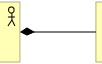 | The composition relationship indicates that an element consists of one or more other concepts. The diamond indicates the owner element. |
Assignment | 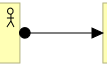 | The assignment expresses the allocation of responsibility, performance of behavior, or execution. |
Aggregation |  | The aggregation relationship indicates that an element consists of one or more other concepts. The diamond indicates the main element. |
Realization |  | The realization relationship indicates that an entity plays a critical role in the creation, achievement, sustenance, or operation of a more abstract entity. The arrow indicates the entity playing a role. |
Dependency Relationships
Concept Name | Notation | Comment |
|---|---|---|
Access | 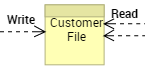 | The access relationship models the ability of behavior and active structure elements to observe or act upon passive structure elements. |
Serving |  | The serving relationship models that an element provides its functionality to another element. The arrow indicates the functionality user element. |
Influence | 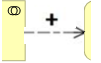 | The influence relationship models that an element affects the implementation or achievement of some motivation element. The arrow indicates the motivation element |
Dynamic Relationships
Concept Name | Notation | Comment |
|---|---|---|
Flow |  | The flow relationship describes the exchange or transfer of, for example, information or value between processes, function, interactions, and events |
Trigger |  | The triggering relationship describes the temporal or causal relations between processes, functions, interactions, and events. |
Other Relationships
Concept Name | Notation | Comment |
|---|---|---|
Association | 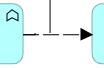  | Association is a specific Relationship which can associate any concepts (including other Relationships. An association is undirected by default but may be directed. Directed relationships are displayed using a half arrow endpoint style. |
Specialization |  | The specialization relationship indicates that an element is a particular kind of another element. The arrow points to the particular element. |
To set an Association Directed Type, you can:
 Use right click,
 or
• Use Relationship property and set the Directed type to ‘true'.