Exiting a Session
When you exit HOPEX, you close your session. You can:
• save in the repository the modifications you have made in your private workspace
• keep the modifications you have made in your private workspace
 These modifications will remain awaiting validation, subsequent modification, or deletion.
• cancel modifications you have made.
From your Web desktop, to exit your work session:
1. From your HOPEX desktop, click Logout  .
.
.The HOPEX exit dialog box appears.
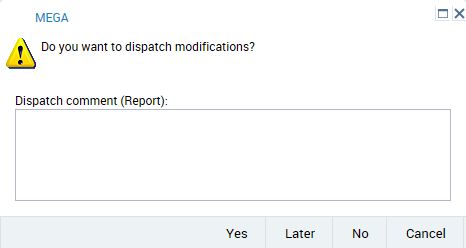
2. (Optional) In the Dispatch comment (Report) frame, enter a comment to remind you of modifications made in your private workspace.
3. Select your HOPEX exit mode.
Click Cancel to not exit your private workspace.• Yes
Modifications you have made in your private workspace are saved in the repository.
 In order to work effectively as a team, it is recommended that you dispatch frequently and regularly. Other users can update their own private workspace without dispatching their work (menu File > Refresh).This exit mode also allows the user to select a different repository the next time he/she logs in.
• No
All modifications you made since your last dispatch will be lost. You can use this option if you want to view data quickly and exit without impacting the repository.
Modifications to your desktop are also lost.• Later
This option allows you to keep your changes without impacting the repository. You can open your session later and continue working but other users are not yet seeing the changes you have made.
 You can have only one current private workspace. When you select the “Later” exit mode, any next session open in a private workspace re-opens the pending private workspace (the profile being the same or not). The private workspace exit mode is applied to all of the modifications you have made in this private workspace (desktops being the same or not).When you switch the desktop (in private workspaces), if you want to keep your modifications in a desktop, it is recommended that you dispatch them.