Supervision Tool
The Supervision tool of HOPEX Server Supervisor enables to open and analyze HOPEX event files.

For detailed information on event files, see:
Supervision tool toolbar
From the Supervision tool toolbar, click:
•  to open one or several specific supervision files
to open one or several specific supervision files•  to refresh calculated view data of the current supervision file
to refresh calculated view data of the current supervision file•  to open the set of snapshots that have been created on the different servers.
to open the set of snapshots that have been created on the different servers. A consolidated snapshot gives an application calculated view over the last three minutes.
•  to view the load state, object consumption on the set of supervised processes.
to view the load state, object consumption on the set of supervised processes.•  to load a supervision domain (reference domain - Standard) so that comparisons can be made.
to load a supervision domain (reference domain - Standard) so that comparisons can be made.•  to export data in CSV format.
to export data in CSV format.•  to check for incidents.
to check for incidents.Supervision tool tabs
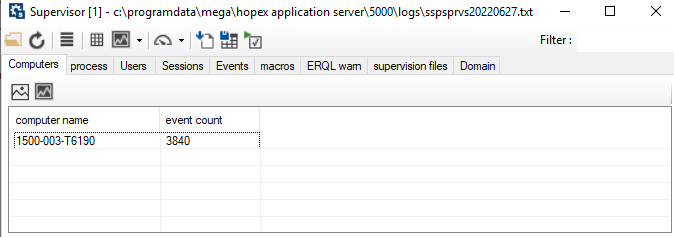
In the Supervision tool, events are grouped by calculated view that gives access to the corresponding list of prefiltered events. Views correspond to the following tabs:
• Computers
This tab shows the list of servers used and its associated event number.
• process
This tab shows the set of supervised processes of the set of servers.
• Users
This tab shows the list of users who logged on the application.
• Sessions
This tab shows the list of current or past sessions of all the servers or workstations supervised.
• Events
This tab shows the list of HOPEX events that have been recorded.
• macros
This tab enables to view macros, for which execution time is high.
• ERQL warn
This tab shows the list of ERQLWarning events that have been recorded.
• supervision file
This tab shows analyzed supervision files.
• Domain
This tab enables to show activity synthesis according to the supervision domain