Viewing the Repository Update Log
You can view the history of the actions performed in the repository after dispatch in:
• the HOPEX Administration application (Windows Front-End)
• HOPEX (Repository Activity navigation window)
 See Handling Updates.
• the Administration desktop (Web Front-End)
• the object History
Viewing the repository update log
To view the repository update log:
1. Connect to HOPEX Administration and select the repository concerned.
2. Right-click the repository concerned and select Repository Log > Open.
The View repository updates log appears.
From HOPEX, select the File > Properties menu. In the dialog box that appears, select the Update tab. The log of the current private workspace is displayed by default.3. Select (/Clear) System Repository to display the system repository (/HOPEX repository) updates.
4. In the Period field, select the period you are interested in.
E.g.: Today, Current week, Current month, From the beginning.
The selected period defines the list of dispatches available in the Begin drop-down list.
5. In the Begin field, select the dispatch from which you want to display the updates.
The first item corresponds to the first dispatch in the repository.6. In the End field, select the dispatch until which you want to display the updates.
You can view the whole repository log, or between two given intermediate dispatches. 7. Click Refresh.
The repository log appears as a list of actions displayed in chronological order.
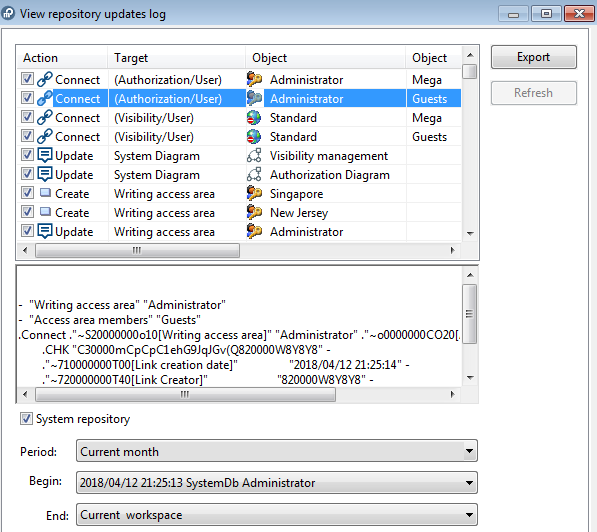 See Exporting Updates.
Indicated for each action are:
• the Action type performed
Example: "Create", "Connect", "Update".
See Command File Syntax for more information on operators.• the type of the object concerned (Target)
• the name of the Object concerned
• the name of the second Object concerned in the case of a "Connect", "Disconnect" or "Change" action
• the person Responsible for the action
• the Delivery date of the action
Format: <D/MM/YYYY h:mm:ss AM/PM>
If you have not dispatched your work yet, the date indicated is the execution date of the action.
• The name of the Dispatch that contains the action, in the following format:
<YYYY/MM/DD hh:mm:ss> <repository> <responsible>
With:
• <YYYY/MM/DD hh:mm:ss>: workspace date and creation time
• <Repository>: name of the current repository
• <responsible>: name of the person responsible for the action
If you have not dispatched your work yet:
<your name> (workspace)
• (when you select the line of a command), the complete text of the update is displayed in the window lower pane.
If needed, to copy the command and paste it in a text file for example, roll the mouse over the whole text, then press <CTRL> + <C> and paste the text in a text file.Displaying dispatches
To display in HOPEX private workspaces dispatched and the content of their updates:
1. Connect to HOPEX.
2. In the Repository Activity Navigation window, expand the Repository Dispatch sub-folder.
All dispatches performed on the current repository and the system repository are contained in the respective <Repository Name> and SystemDb folders.
3. Expand the repository folder concerned.
Dispatches are filed by day, week and month.
4. Expand the dispatch concerned.
Each dispatch details the updates made to an object.
5. Expand the update concerned.
In the properties of the object concerned, the General > History tab details the content of the dispatch in the form of a list of actions performed on the object concerned.