Viewing User Process Error Trace Files
Trace files of errors in user processes contain information on operations executed and possible anomalies.
If there is a problem with a repository, this file will help the MEGA Research Center to analyze it.
Each trace file has the following characteristics:
• format: *.txt
• name: megaerrYYYYmmDD
where YYYYmmDD represent the year, month and day when the file was generated
Example: file Megaerr20110204.txt was generated on 04 February 2014).
• information on errors:
• date and time of the error
• action that produced the error
• associated error message
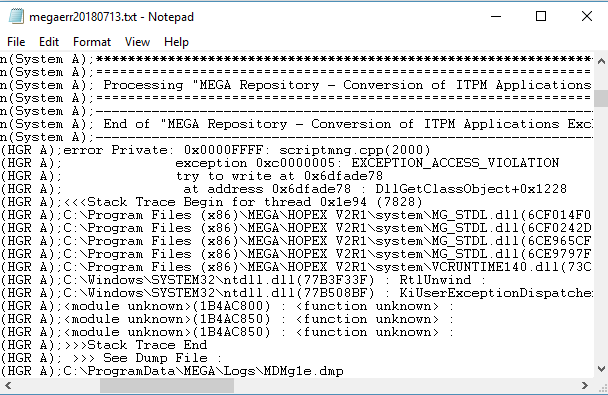
You can open the trace file from:
• HOPEX Administration
• HOPEX Server Supervisor
• HOPEX
Opening the trace file from HOPEX Administration
To open the trace file from HOPEX Administration:
1. Connect to HOPEX Administration.
2. In the menu bar, select Help > Technical Support > Error Logfile > Edit.
Opening the trace file from the HOPEX Server Supervisor tool
To open the trace file from the HOPEX Server Supervisor tool:
1. (Prerequisite) The HOPEX Server Supervisor tool is started, see Starting HOPEX Server Supervisor.
2. In your workstation system tray, right-click HOPEX Server Supervisor  and select Mega Logs > Open Daily Logs.
and select Mega Logs > Open Daily Logs.Opening the trace file from HOPEX
To open the trace file from HOPEX:
1. Connect to HOPEX.
2. In the HOPEX menu bar, select Help > Technical Support > Error Logfile > Edit.
 Alternative: in the HOPEX menu bar, select Help > About HOPEX, then in System Information, select Error Log > Edit.