Accessing HOPEX Administration
The Administration application is the HOPEX administration application accessible from the Windows desktop. It accesses HOPEX Application Server (HAS) via the URL of the Web server.
 For detailed information regarding HAS, see "HAS Installation guide" Installation and Deployment Technical Article.
To access the HOPEX Administration (Windows Front-End) application:
1. Access the HAS instance repository.
Default path: C:\ProgramData\MEGA\Hopex Application Server\ <name of the HAS instance on which is created the environment>
E.g.: C:\ProgramData\MEGA\Hopex Application Server\5000
2. Double-click the "Administration.exe" file  .
.
.The HOPEX Administration main window opens.
An environment preceded by a red icon is no longer accessible.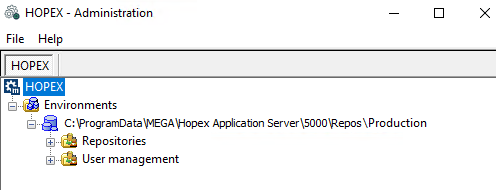
HOPEX Administration is presented in the form of a navigation tree containing the elements you can manage:
• site
users are managed in the Administration desktop only.See Managing Users.