Discovering the NAF Navigation Tree
The NAF navigation tree contains all the architectures contained in the HOPEX repository.
Accessing the NAF navigation tree
To launch the NAF navigation tree:
 In the navigation menu, select Architectures.
The tree contains:
• an "Architectures" folder in which all the architectures of the current repository are located.

• a "NAF Dictionaries" folder which contains the official NAF terms and acronyms, if imported, approximately 50% of which are approved by NATO.
Description of the Architecture Tree
NAF architectures are found in the "Architectures" folder.
Each architecture displays folders which correspond to one of the seven NAF views:
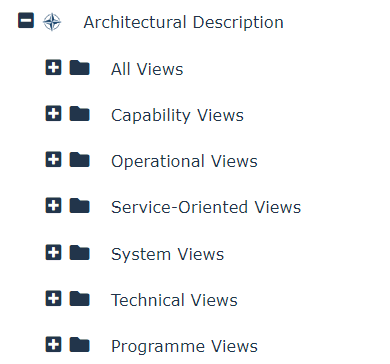
These folders are automatically created with architectures. When expanded, each View folder reveals other folders which contain items that correspond to the subviews associated to the View described.
For example, in the "All Views" folder the NAV-1, NAV-2, NAV-3a and NAV-3b folders are displayed. The items of the different subview folders could include reports, documents, diagrams, etc.
Description of the Dictionary Tree
While creating architectures, it is extremely important that consensus be made about the terms used for any item defining the architecture. This is why the DoD created a set of official definitions for all common terms used in the defense sector.
HOPEX NAF is supplied with a HOPEX dictionary of the official NAF definitions. It contains more than 6,000 terms as well as over 6,000 acronyms and abbreviations, most of which have been approved by NATO and are therefore relevant in the context of NAF Projects with military orientation.
To view the NAF terms and acronyms contained in the HOPEX dictionary:
From the navigation menu, select Architectures and expand the NAF Dictionaries folder.The terms and acronyms are arranged in alphabetical order. Any of these definitions can be attached to the items relating to a specific architecture.