 NCV-6 Capability to Operational Activities Mapping
The NCV-6 Capability to Operational Activities Mapping subview describes the mappings that exist between capabilities and the operational activities that they support.
 A Business Capability is a set of features that can be made available by a system (an enterprise or an automated system).
This subview is used to show which capabilities support which operational activities. It can also be used to show which capabilities are supported (or not), to reveal gaps in service provisions as well as to see if there are any redundancies, where a capability is supported by more than one operational activity.
The NCV-6 Report Template
The NCV-6 report template comes with three parameters:
• The Architecture parameter, which specifies the architecture to be analyzed.
• The Capability Subset is an optional parameter. You can limit the scope of the study to a subset of the selected capabilities by setting one or more capabilities. All the capabilities of the architecture are used in the study if this parameter is not set.
• The Operational Activity Subset parameter, which is an optional parameter. This parameter is used to reduce the scope of the study to a subset of the selected functional activities and/ or functional processes. If this parameter is not set, all the functional activities and functional processes of the architecture are taken into account.
The NCV-6 Capability to Operational Activities Mapping Chapter
The Capability to Operational Activities Matrix chapter provides a table which shows the capabilities that support selected operational (functional) activities and functional processes.
This support is represented by checkmarks. A checkmark appears in the table between an operational activity or functional process and the capability that supports it.
 Click in the matrix to add or remove checkmarks.
 When links exists a "+" appears under the checkmark. If you click on this "+" a table appears with the type of link created, and the object type and objects that are linked.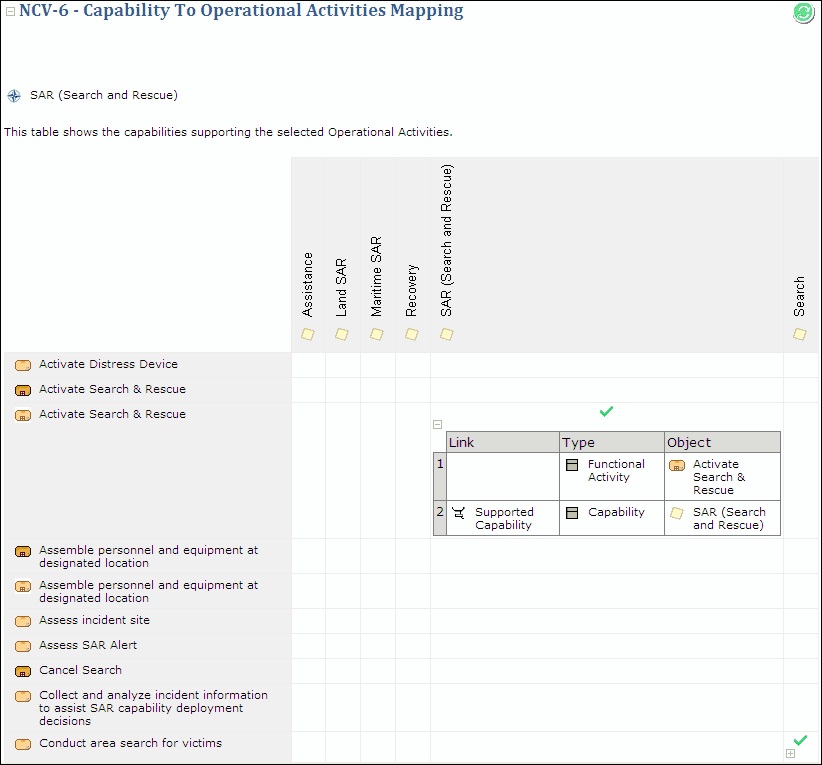
Example of an NCV-6 Capability to Operational Activities Mapping Matrix