1 Introduction
1.1 Aim of this documentation
The aim of this documentation is to describe the Scheduler component embedded into HOPEX platform:
what it is used for
how to configure it
how to add scheduled jobs
1.2 Presentation
The Scheduler component enables to execute a macro at a given date and time.
Example: the following features rely on the Scheduler possibilities:
Steering Calendars
Alignment: Automatic transfers
Scheduled Actions in Workflows
Reminders
Scheduled transitions
Assessment Campaign
Macro execution scheduling combinations are the following:
Trigger at a date and time
Recurrent triggering (daily, weekly, monthly)
Trigger relative to another reference date
1.3 Requirements
The Scheduler component meets the following requirements:
Repository requirement: RDBMS repository
SOA deployment (see Architecture section)
o Scheduler is a web service hosted into the MOS, it requires the MOS to be deployed and configured
o MOS can be deployed either with Windows front end or HOPEX Web front end, so that Scheduler can be used in a full Windows front end environment, in a HOPEX Web front end environment, or in a mixed environment
Availability: The scheduler is available with products containing features relying on the Scheduler like HOPEX Alignment and HOPEX Assessment. For an exhaustive list of products in which the Scheduler is available, see each specific product description documentation.
1.4 Limitation
Due to date/time internal storage in HOPEX application, the Scheduler does not currently manage date/time after year 2038.
This limitation will be overridden in future versions.
1.5 Architecture
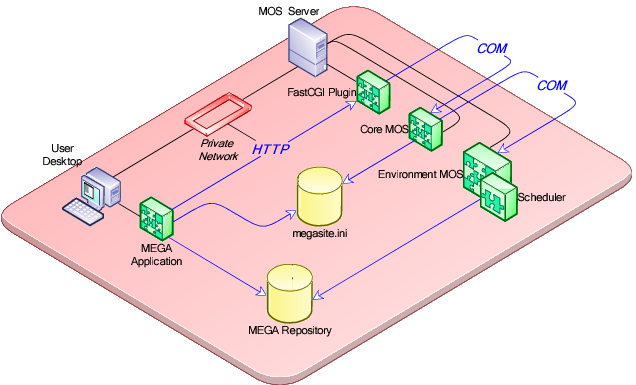
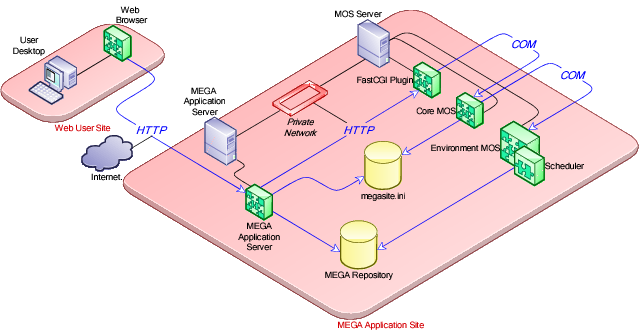
The Scheduler component is hosted into the MOS.
There is one Scheduler instance per environment.
The HOPEX Application client requires an HTTP connection to the Core MOS. The Core MOS application delegates the Scheduler solicitations to the matching Environment MOS.
Scheduler clients have access to the Scheduler using a specific API (see Scheduler Client API section).
1.5.1 Web Front-End architecture
1.5.1 Windows Front-End architecture