Conditioning a transition
To condition a workflow transition:
1. In the properties dialog box of a workflow transition, select the Conditions tab.
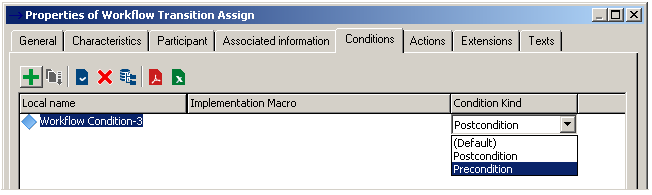
2. Create a condition and select a Macro.
3. In the Condition Kind field, specify if it is a:
• Precondition
• Post-condition
Precondition
The pre-condition first checks that pre-conditions are met for the transition to be proposed.
If conditions are not met, the menu corresponding to the transition is not proposed to the user.
 Specifying a condition on the first workflow transition of a workflow definition is equivalent to defining a condition on the subject. For more details, see Overview of Workflow Definitions (paragraph concerning workflow conditions).
Post-condition
Possible transition choices are presented to the user.
if required conditions are not met, a message warns that the transition will not be executed.
In batch mode, conditions are systematically assessed.