Programmed Deformation
When default deformation is not suitable, it is possible to program deformation using shape programming language.
Deformation Code Editor
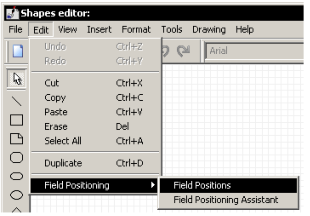
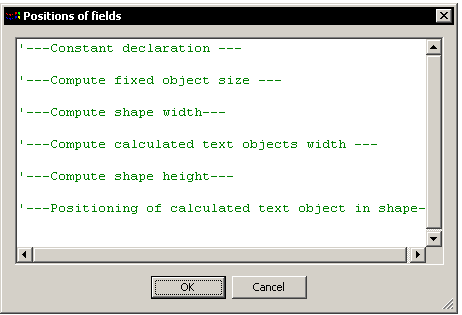
In the shape editor, the "Field positioning" option in the "Edit" menu gives access to a shape deformation program entry space:
Object Identification
Basic Object Identification
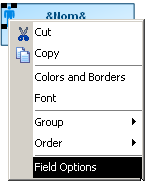
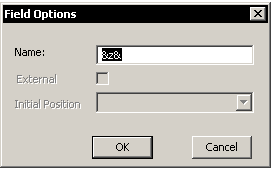
In order to be referenced at programming, each shape object must first be identified by a name. This naming can be via the "Field Options" command in the pop-up menu of each object. The name should be prefixed and suffixed by "&".
Identifying Calculated Fields
Calculated fields are "self-named". The text they contain can be directly used as the object identifier. (Example: &Name&).
Virtual Object Identification
The language is enhanced by two virtual objects for general use:
• "Shape" object: Rectangle containing graphical elements of the shape except for calculated fields.
• "Object" object: Rectangle containing all graphical elements of the shape including calculated fields.
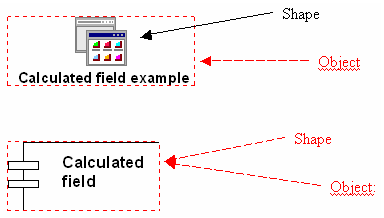
Use of the "Object" object should be limited to cases where we wish to place calculated fields outside the Shape object.
Language Syntax
The value unit is 1/360 inch (14/360 inch ≈ 1mm).
|
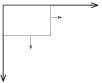
The coordinates system point of origin is the top left of the shape.
|
 |
Size
width: width
shape.default.width: Original width (in the MGS) of the shape without calculated fields
shape.default.height: Original height (in the MGS) of the shape without calculated fields
Position
top: top
bottom: bottom
left: left
right: right
hcenter: horizontal median
vcenter: vertical median
Operators
= , + , - , *
max(val1,val2,...,val10) Operand number is limited to 10.
Functions
RelX(n) and RelY(n), where n is a value, enable definition of constants proportional to shape width and height.
For example, with CNST = RelX(10),
CNST is 10 if shape width is equal to its initial width.
CNST is 15 if shape width is equal to 1.5 times its initial width.
Comment
' at start of line
To access these properties, syntax is as follows:
• For calculated fields: object name without &s . property (eg. Att.width)
• For the "Shape" object: Shape.property (eg. Shape.hCenter)
• For the "Object" object: Object.property (eg. Object.top)
• For other named objects: Shape.object name with &s.property (eg. Shape.&Logo&.bottom)
Programming
The shape deformation program is applied each time the user resizes an object based on this shape, or when one of its calculated fields changes value.
Program lines are executed singly and sequentially.
Line order is therefore of major importance, and any inversion of these lines can cause quite unexpected deformation behavior.
Calculated Field Programming
If "Word-wrap text" is active, any modification of field width by code will result in immediate recalculation of its height:

If "Word-wrap text" is inactive, the calculated field should be sufficiently wide to display the text on a single line. If in programming we attempt to assign too narrow a width, an adequate minimum width is authoritatively reassigned.
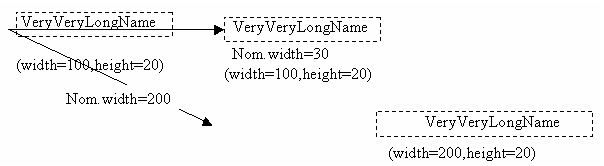
Modification of field height is never taken into account. It is always automatically recalculated as a function of field width.
General Programming Recommendations
Deformation code is called in 2 cases:
When we change size of a concept based on this shape:

Before code application
Here the code should handle text resizing.
The content of a calculated field is changed:

Before code application
Here the code should handle shape resizing.
To limit side effects due to incorrect programming, the following steps are recommended:
• Fix the size of fixed size objects.
• Fix the final width of the shape as a function of the width of fixed size objects, calculated fields and the width required for the shape (shape width before code application, see example below). (NB1)
• Fix the final width of the calculated fields as a function of the final width of the shape. (NB2)
• Fix the final height of the shape as a function of the height of fixed size objects, calculated fields and the height required for the shape. (NB2)
• Fix the positions of objects within the shape
NB1: Before deformation code execution, the width of calculated fields with word-wrap active is 1mm (authorized minimum), and the width of calculated fields with word-wrap inactive is equal to the effective value necessary for visibility of content. The width of all calculated fields of the shape must therefore be defined.
NB2: Since shape height depends on height of calculated fields, and height of calculated fields automatically depends on their width, it is essential to fix the width of calculated fields before fixing shape height.
Default Code
A shape without a code will not have the same deformation behavior as a shape with a code performing no function (no modification of shape objects properties). A default code is applied to shapes without code.
For each calculated field, the following instruction block is inserted by default in the code.
Field refers to the calculated field.
The following constants are calculated compared with the initial state of the shape (the state that can be seen in the shape editor)
FieldWidthInit: width of calculated field
FieldTopInit: vertical position of calculated field
FieldLeftInit: horizontal position of calculated field
BLOCK:
Shape.width = max( Shape.width , Field.width )
Field.width = RelX ( FieldWidthInit )
Shape.width = max( Shape.width , Field.width )
Field.top = Shape.top + RelY ( FieldTopInit )
Field.top = Shape.top + RelY ( FieldTopInit )
This code enables the calculated field to maintain the same relative position within the shape.
In programming a shape, position and size of all calculated fields of the shape must be managed.