Writing the macro implementation
Interfaces to implement
Report chapters
A Java report chapter must implement one of the following interfaces:
• com.mega.modeling.analysis.AnalysisReport
• com.mega.modeling.analysis.AnalysisReportWithContext
The getReportContent method is the only method required to implement these interfaces. Its parameters are:
• a Mega Root,
• a Map of parameter Lists referenced by the HexaIdAbs of the “Analysis Parameter” repository object,
• an optional userData object,
• and in the case of AnalysisReportWithContext an extra Analysis object which provides contextual information.
It produces the report content in the form of a ReportContent object. This is an instance of the ReportContent Java class, to which all data and view information is given in order to pass it to the analysis engine and its renderers.
More information on ReportContent objects is available in the “Java analysis data structure” technical article and in the engine Javadoc.
This typically results in either of the following structures:
public class MyReport implements AnalysisReport {
@Override
public ReportContent getReportContent(final MegaRoot root, final Map<String, List<AnalysisParameter>> parameters, final Object userData) {
…
}
}
public class MyReport implements AnalysisReportWithContext {
@Override
public ReportContent getReportContent(final MegaRoot root, final Map<String, List<AnalysisParameter>> parameters, final Analysis analysis, final Object userData) {
…
}
}
Callbacks
Callback calls allow for user interactivity in tables and trees, by allowing the execution of a Callback function when the user clicks on a cell. The callback function subsequently updates the cell content.
The Java implementation of the macro that handles callback calls must implement the com.mega.modeling.analysis.AnalysisCallback interface.
This can be the same macro and Java class as the report chapter itself or a different macro.
The Callback method is the only method required to implement the AnalysisCallback interface. Its parameters are:
• a Mega Root,
• the HTML content of the cell that was clicked,
• MegaCollections of the line and column objects of the cell,
• an optional userData.
It produces the new content to be rendered in the clicked cell, in the form of an HTML string.
For example:
public class MyReportCallback implements AnalysisCallback {
@Override
public String Callback(final MegaRoot root, final String HTMLCellContent, final MegaCollection ColumnMegaObjects, final MegaCollection LineMegaObjects, final Object userData) {
…
}
}
Implementing the macro
General steps
The implementation of the getReportContent function follows the following general steps:
• Create a new ReportContent object that will contain all report data and views:
final ReportContent reportContent = new ReportContent("");
• Create one or more Datasets (Java objects that contain all the data to be rendered) and add them to the ReportContent, getting the ID of the dataset for future use:
final Dataset d = new Dataset("");
final int datasetID = reportContent.addDataset(d);
• Create one or more Dimensions (the equivalent of x, y, etc. axis in a diagram) and add them to the Dataset(s):
final Dimension dim = new Dimension("");
d.addDimension(dim);
• Create one or more items and add them to the Dimension(s). This is the equivalent of row or column headers in a table.
dim.addItem(new Text("Some text…", false));
• Create one or more items and add them to the Dataset(s):
d.addItem(new Value((double) n), "1");
• Create one or more Views (or Texts or MegaObjectProperties), using the ID of the dataset they should represent, and add them to the ReportContent. A view links a dataset to a renderer in order to define where and how the dataset should be rendered.
final View v = new View(datasetID);
reportContent.addView(v);
• Add one or more renderers to the View(s) to specify how the view dataset should be shown (here, as a table):
v.addRenderer(AnalysisReportToolbox.rTable);
• Return the now complete ReportContent:
return reportContent;
More information on the data structure of ReportContent, Dataset, Dimension, View, Item, etc. is available in the “Java report data structure” technical article and in the Javadoc engine (HOPEX Customization (Windows) > Using APIs > JavaDoc).
Example
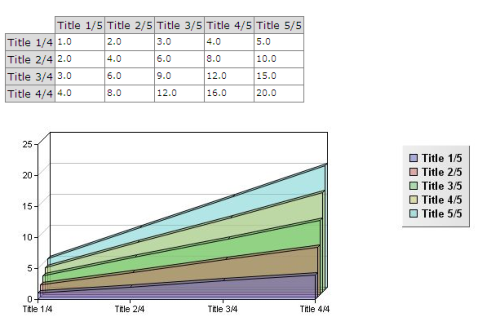
A basic working example is as follows:
import java.util.List;
import java.util.Map;
import com.mega.modeling.analysis.AnalysisParameter;
import com.mega.modeling.analysis.AnalysisReport;
import com.mega.modeling.analysis.AnalysisReportToolbox;
import com.mega.modeling.analysis.content.Dataset;
import com.mega.modeling.analysis.content.Dimension;
import com.mega.modeling.analysis.content.ReportContent;
import com.mega.modeling.analysis.content.Text;
import com.mega.modeling.analysis.content.Value;
import com.mega.modeling.analysis.content.View;
import com.mega.modeling.api.MegaRoot;
/**
* This is a basic demonstration report.
* @author NLE
*/
public class MyReport implements AnalysisReport {
public ReportContent getReportContent(final MegaRoot root, final Map<String, List<AnalysisParameter>> parameters, final Object userData) {
final ReportContent reportContent = new ReportContent("");
// Creating a 2D Dataset and its dimensions
final Dataset d2 = new Dataset("");
final Dimension dim21 = new Dimension("");
final Dimension dim22 = new Dimension("");
// Set the dimension sizes
// (compulsory only when no Items are added to the dimension)
dim21.setSize(4);
dim22.setSize(5);
// Add the dimensions to the Dataset
d2.addDimension(dim21);
d2.addDimension(dim22);
// Filling in the dataset and its dimensions
// Arbitrary data is used here
for (int i = 1; i <= 4; i++) {
dim21.addItem(new Text("Title " + i + "/4", false));
for (int j = 1; j <= 5; j++) {
d2.addItem(new Value((double) i * j), i + "," + j);
}
}
for (int j = 1; j <= 5; j++) {
dim22.addItem(new Text("Title " + j + "/5", false));
}
// Add the dataset to the report
final int datasetID = reportContent.addDataset(d2);
// Add a table and list view of the dataset
// List will only be used if table cannot be used
final View v1 = new View(datasetID);
v1.addRenderer(AnalysisReportToolbox.rTable);
v1.addRenderer(AnalysisReportToolbox.rList);
reportContent.addView(v1);
// Add an area chart view, with the same dataset (not duplicated)
final View v2 = new View(datasetID);
v2.addRenderer(AnalysisReportToolbox.rAreaChart);
reportContent.addView(v2);
return reportContent;
}
}
This code typically results in the following rendering:
Going further
You should refer to the Javadoc for all possible options and possibilities.
The Javadoc is accessible:
• in HOPEX online documentation (HOPEX Customization (Windows) > Using APIs > JavaDoc):
o Report API
o MEGA API
o Toolkit API
o Workflow Engine API
• contextually in Eclipse if you configured it as suggested in the Prerequisites section
• in your HOPEX installation directory ("java\doc"), in HTML format in a zip file “mj_anls.doc.zip".
You can make use of all MEGA Java APIs (also available in the corresponding “mj_api.doc.zip" javadoc) to handle MegaObjects and MegaCollections.
A more complex example is provided at the end of this document.