Report Data View Properties: Graph
A Report Graph View is used to display a graph in a Report Container. The data displayed in the graph is provided by a Report Data Source of GraphSet Definition type.
Characteristics
The Characteristics page includes the following properties:
• Sharing:
• "Public" (default): the Report Graph View can be reused in several reports. The Report Graph view is available at Report Template or Report Chapter creation.
• "Private": the Report Graph View cannot be reused.
• Data Source defines the GraphSet Definition on which the Report Graph View is based.
• General Style defines the style to apply to the Graph view (i.e. values for a set of renderer type parameters)
For example: node display style.
• 3D illustration defines whether 3D display is available or not
• Default illustration defines the default display when 3D illustration is available
Graph
The Graph page defines each Report Graph Layer display:
• its Visibility
Values: Visible, Never visible, or Hidden by default.
• its Nodes
 For details on its properties and style, see Report Graph Node properties.
• for each node its Fields
A field can replace the node object, be displayed in tooltips (by default), or replace the object name.
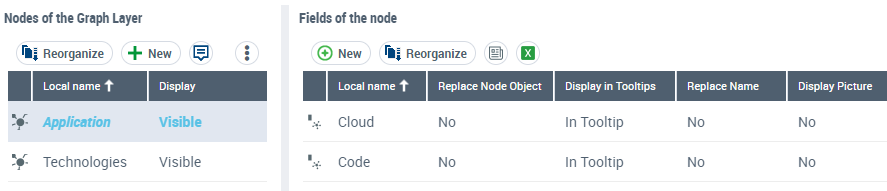
• for each node its Arcs
For details on its properties and style, see Report Graph Arc properties.• for each arc its Fields

Filter
The Filter page enables to define which filters can be displayed in a report for this Report Graph View.
A filter enables to restrict the nodes or fields that are considered in the report.
See How to Define the Filters Displayed in a Report section.A filter is defined by the following Characteristics:
• Filtering Group Id
• Input type defines how the report user can define its condition:
• "Single Value"
• "Multiple Values"
• "Continuous" to define a range of values.
• Behavior defines the filter action on the report:
• "Immediate Refresh" (for a report easily calculated): as soon as the user modifies the filter the report is updated.
• "No Refresh": the user needs to click the Refresh button to update the report.
• values:
• Contains: defines the values the user can use for a specific filter.
• Shows: defines how to manage empty values.
I.e.: "Add empty values", "Display only empty values", "Display only non empty values", or "Consider all values"
• for numerical values: Less than, Equals to, Greater than
• for character strings: Begins with, Ends with
Report Graph Node properties
A node is defined by the following Characteristics:
• Name Display attribute enables to hide the name of node in the Graph.
Values: Show Name (default) or Hide Name.
• Display attribute enables to hide the node in the Graph.
Values: Visible (default) or Not visible.
You can also define a Style (or conditional style) on a node, see Style.
Report Graph Arc properties
An arc is defined by the following Characteristics:
• Visibility attribute enables to override the visibility of the GraphSet Arc Definition in the Graph.
Values: Visible (default) or Not visible.
• Arrow Direction attribute enables to override the orientation of the GraphSet Arc Definition or to hide the arrow in the Graph.
Values: Default, Reverse, or No arrow.
• Grouping specifications section enables to configure:
• a grouping by object or by field, or grouping all of the arcs
• the detailed list of objects
Values: Node, Object field of a node.
You can also define a Style (or conditional style) on an arc, see Style.
Style
The Style page enables to define values for a set of renderer type parameters of the Report Graph View at graph element level (node, arc).
The Style page of a node/arc enables to define a style on the node/arc when the condition is satisfied.
If no condition is set, the style always applies. You can create a set of conditions and associate each of them with styles. Conditions are considered one after another.
The style can apply:
• to all the nodes or arcs,
• on condition to certain nodes or arcs
For example, you can define:
- a specific style on arcs.
- a conditional style on nodes: the nodes "Applications" for which the "Cloud" field value is "Saas" are displayed with a blue background.
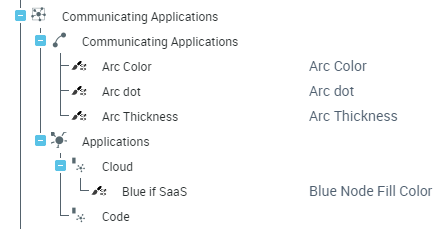 See example in How to apply a Conditional Style to a Graph section.