Managing Exhibited Business Capabilities
 An exhibited business capability is exhibited by an Enterprise Stage with quantified measure (KPI) and potential geopolitical scope (Site) for a defined market segment (Business Partner).
Accessing the list of exhibited business capabilities
To access the list of exhibited capabilities of a transformation phase:
1. Click the Business > Strategic Planning navigation menu.
2. Select the enterprise that interests you and unfold the tree of strategic components.
3. Expand the Transformation stages folder.
4. Expand the tree of the strategic component that interests you.
5. Expand the Exhibited Business Capabilities folder.
The exhibited business capabilities list is displayed.
Creating an exhibited business capability
To create an exhibited business capability from an transformation stage:
1. Open the Exhibited Capabilities properties page of the transformation stage.
A page presents the tree of the business capabilities of the enterprise business capability map.
2. Select the business capabilities that interests you and click Add.
The exhibited business capability is created and appears in the Exhibited business capability column.
3. Select the exhibited business capability.
The Exhibited business capability properties page opens on the right.
4. In the Enterprise objectives column, click the arrow to display the transformation stage objectives.
5. Select the objectives concerning the exhibited capability.
6. In the Business Capability Realization column, click the arrow to display the realizations of the current business capability in transformation stage context.
 For more details on implementation of business capabilities, see Creating Fulfillment of a Business Capability.
7. Select the realizations concerning the exhibited capability.
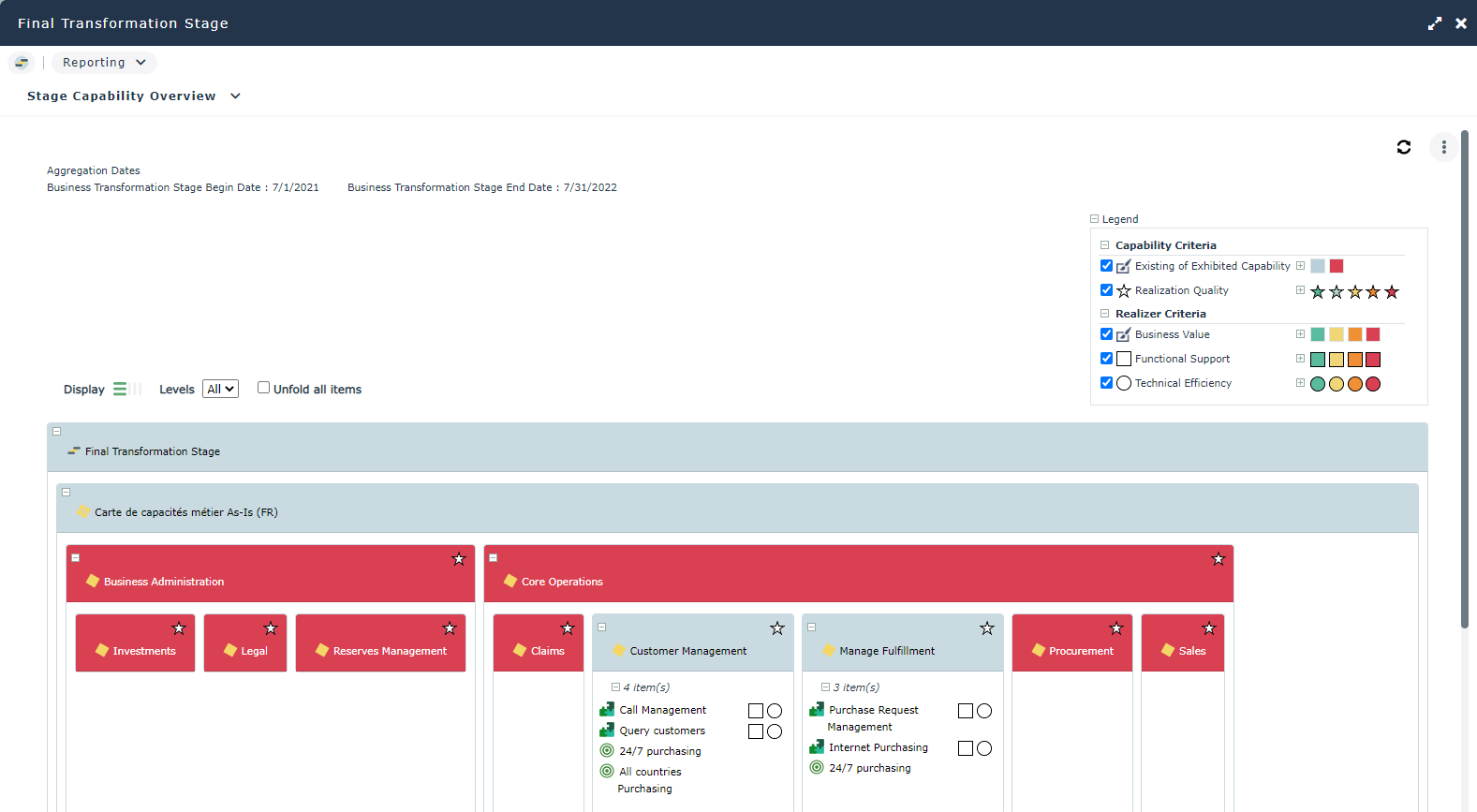
The details of elements connected to an exhibited business capability are displayed in a transformation stage report, see Stages Capabilities Synthesis report.The properties of an exhibited business capability
The Characteristics property page of the exhibited business capability provides access to:
• its Name,
• its Owner, by default the current transformation stage,
• Desired Capability Effect, provides access to the exhibited business capability outcomes.
An exhibited business capability is described by the following pages:
• the Structure page specifies a part of the list of business capability components that constitute the exhibited business capability, as well as the dependencies between these components,
For more details on business capabilities components, see Using the capability compositionsand Defining business capability dependencies.• the Fulfillments page provides access to the list of Components implement the business capability.
For more details on implementation of business capabilities, see Creating Fulfillment of a Business Capability.• The Qualified Value and Measurable Property pages provide access to the list of indicators associated with the exhibited business capability.
For more details, see Using performance indicators.• the Assessment page provides access to the assessment results of the business capabilities realization.
For more details on the assessments of business capabilities, see Creating a business capability assessment.• the Transformation page provides access to transformation stages connected to the exhibited business capability.
Stages Capabilities Synthesis report
This report is available on a dedicated Report properties page of the transformation stage. It presents a view of the enterprise business capabilities highlighting the exhibited business capabilities.