Incremental Generation
When a database has already been generated, you can subsequently reflect only changes to the database using "Modification" mode of SQL generation.
For a database, incremental generation allows you to:
• consult in an HTML report the differences between the database and its representation in HOPEX.
• produce SQL scripts enabling update of the target database from its description in HOPEX.
Incremental Generation Objects
Objects managed by incremental generation are the same as those of generation in "Creation" mode: table, column, primary key, foreign key, index, data group, logical view, material view, trigger, stored procedure, function, synonym, cluster, partition.
Scripts generated by HOPEX manage only the structure of relational objects, their content is not covered. Incremental generation options enable isolation of SQL orders that require particular precautions or additional processing.
Running Incremental Generation
Generation options
Incremental generation is done in a global file; it is carried out from the database and not from a particular modified object.
Before starting generation:
1. Right-click the database and select Properties.
The properties window of the database appears.
2. Click the drop-down list then Options > Generation.
3. In Script Distribution, select "A global file".
4. Click OK.
In options, you must also indicate incremental generation mode, which authorizes object deletion or not.
For more details on generation options, see Configuring Database Generation.
Start the generation wizard
To run incremental generation:
1. Right-click the database and select Generate the code.
2. In the Generation mode field, select "Modification".
 This "Modification" command is only available for the main DBMSs. See Supported DBMS versions.
3. Select the Data source. Incremental generation can be carried out:
• From an ODBC connection.
• From an extraction file See Extracting Database Schema Description from Data Sources.
4. Click Next.
5. When connected to the target DBMS, enter the name of the owner. This will enable you to filter the tables to be taken into account in the generation.
6. Click Next.
The result window presents two files, the SQL file and a "Report.htm" file. The latter file is a report of the generation. It is a dynamic file that presents initial content of the database and modifications carried out.
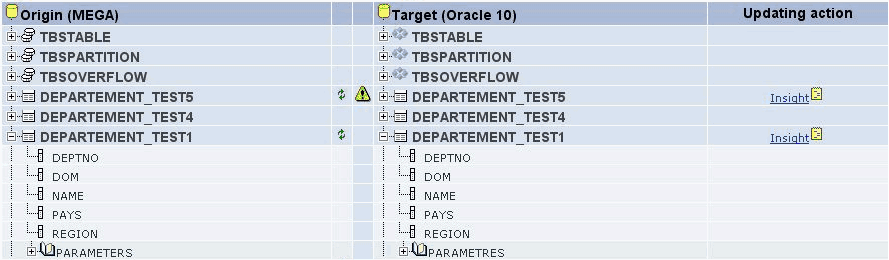
Each row of the list describes:
• The HOPEX object. This can be empty if it has been deleted from the HOPEX repository.
• The DBMS update reference as compared to HOPEX. The various actions possible on objects are:
• Creation 
• Modification 
• Deletion 
• Replacement 
• A warning symbol  when the update of a DBMS object is not complete, or when this must be handled with care. When this icon is present, a block in the generated script details what cannot be updated.
when the update of a DBMS object is not complete, or when this must be handled with care. When this icon is present, a block in the generated script details what cannot be updated.• Object on DBMS side. This can be empty in the context of creation on the HOPEX side.
• The link to the object update script.
From each object you can access all its sub-objects by expanding the corresponding tree. You can also view the physical parameters. In a context of object modification, only the modified physical parameters are displayed.
There is also a report of the generation (.txt) in the properties dialog box of the generated database.