Using Automatic Translation for Data
The automatic translation proposed by HOPEX is based on Microsoft Translator Text API.
Prerequisites for the use of automatic translation
For the commands related to automatic translation of data to be available, you must have acquired a Microsoft Translator Text API license.
 For further details about this license, see https://azure.microsoft.com/en-us/services/cognitive-services/translator-text-api/.
An option enables your administrator to enter the Authentication key number, enabling activation of the automatic translation APIs.
For more details on this option, see the “Prerequisites for the use of automatic translation” chapter in the HOPEX Administration > Automatic Translation Administration Technical Article.Introduction to the automatic translation of data
There are two ways of using automatic translation of the data created by the users:
• interactively, object by object:
For further details, see Using interactive automatic translation of an object.• per batch processing by your Administrator.
For further details, see Using the incremental automatic translation batch.Automatic translation can only be used on the repository data created by the user. All the fields defined as translatable are translated automatically. For example:
• the Name,
• the Comment.
Using interactive automatic translation of an object
The automatic translation of the repository data operates from a source language to a target language.
To automatically translate an object from the data language into another language:
1. Right-click the object to open its pop-up menu.
2. Select the command Automatic translation > To and select the target language.
For more details about the list of available languages, see Defining the available languages.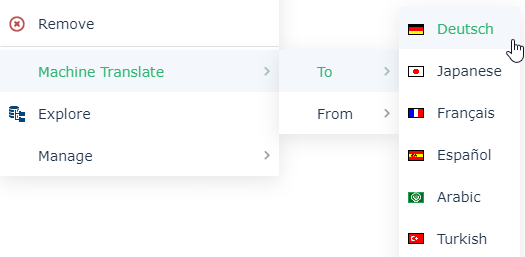
The name of the object and its comment are automatically translated.
If you use the command Automatic translation > From, you need to specify the source language. The target language is the data language.Using the incremental automatic translation batch
The incremental automatic translation batch makes it possible to translate all translatable data of the repository for which the source language has been entered (or modified) since the last translation into the target language.
Only your Administrator can activate the automatic translation batches. To activate automatic translation batches, the Administrator must create a trigger in the administration tool which implements the incremental automatic translation macro. When the trigger has been created, you must then plan the automatic update of the translations.
For more information on trigger configuration, see the "Automatic Translation Administration" chapter in the HOPEX Administration - Supervisor guide.Summary of automatic data translation conditions
The translation date for a data item in a specific language is indicated by two attributes:
• Language Update Date (<Language>) (or LinkLanguageUpdateDate (<Language>) for a link) if the translation has been entered manually, see Entering Data in Several Languages.
• Machine translation update date (<Language>) if the translation has been automatic for the data item, see Using Automatic Translation for Data.
So that the automatic batch translation does not modify a translation entered by a user, if the attribute Language Update Date (target language) is completed, then automatic batch translation of the data item is not possible. The only automatic translation authorized in this case is interactive.
Incremental automatic translation of a data item is performed if:
Language Update Date (<source language>) > Machine translation update date (<source language>) AND (Language Update Date (<target language>) is blank OR Language Update Date (<source language>) > Language Update Date (<target language>))
The value of the data item has been modified manually in the source language without the translation in the target language being updated.
In this case:
Machine translation update date (<source language>)= Machine translation update date (<target language>)= current date
Consequently, the initialization phase of automatic batch translation consists in initializing for the current date the fields Machine translation update date (<source language>) and Machine translation update date (<target language>) for all the data items for which Language Update Date (<target language>) is blank.