Opening a Diagram in Edit Mode
Zooming
Zoom features enable, for example, to move easily through the diagram or to get an overview of the diagram.
In a diagram in edit mode, you can:
• use the  and
and  buttons at the bottom of the edit zone to zoom in or out.
and buttons at the bottom of the edit zone to zoom in or out.• zoom precisely using the field 
To perform a precise zoom in a diagram:
1. In the diagram editing bar, use the field to refine your zoom.
field to refine your zoom.2. You can:
• enter a precise zoom value in the field
• select in the drop-down list:
- a percentage
- “Width”: to display the entire diagram in its width
- “Height”: to display the entire diagram in its height
- “Last”: to return to the previous zoom
- “Page”: to display the entire diagram
 Press the <Ctrl> key and simultaneously roll the mouse wheel to zoom in the full page (this is a Web navigator feature).
Moving a Diagram
After zooming in a diagram, it may be useful to move the diagram quickly, without using the scroll bars.
To move a diagram:
1. In the diagram editing bar, click Move  .
.
.2. Click in the page, in a blank area outside the diagram.
3. Hold your click down, and move through the page as you want.
To quit this moving mode, in the diagram editing bar, click Select  .
.Handling a Diagram Preview
In a diagram preview, you can:
• perform actions on the diagram
E.g.: share and print the diagram, switch to edit mode
• perform actions on the objects of the diagram
E.g.: access diagrams containing or describing an object included in the diagram.
• go back/forward to the previous/next display
Navigating in a diagram preview
To zoom in or out in a diagram preview, you can:
• roll the mouse wheel in the appropriate direction
• use the and buttons at the bottom of the edit zone
and buttons at the bottom of the edit zoneWhen you are in a diagram preview, you might need to move the diagram around depending on your zoom level.
To move the diagram around, drag & drop it in the direction of your choice.
Diagram preview toolbar
Below are the main icons available.
Unavailable icons are grayed.|
Icon
|
Description
|
|---|---|
 |
Edit the diagram
Displays the diagram in edit mode
|
 |
Refresh this diagram
Refreshes the diagram, for example if some components have been removed from the repository.
|
 |
Print this diagram
Displays the diagram as a PDF file, which enables to print it
|
 |
Save the picture as
Enables to save the displayed diagram as a picture in *.png, *.svg, *.emf, or *.jpg format
|
 |
Share this diagram
Enables to share the diagram by email
|
 |
Compare
Enables to compare diagrams when using duplicates of diagrams
See Comparing a Diagram.
|
|
|
Zoom in
Enables zooming in the diagram
The mouse wheel enables to zoom in too
|
|
|
Zoom out
Enables zooming out from the diagram
The mouse wheel enables to zoom out too
|
 |
Open in new tab
Appears to the right of the diagram when hovering the cursor. Displays the properties of the object described by the diagram in a new tab.
|
 |
Described object properties
Appears to the right of the diagram when hovering the cursor. Displays the properties of the object described by the diagram. Also contains a Review notes tab.
|
Using the pie menu in a diagram preview
In a diagram preview, you can perform actions on objects:
• access its properties
• access review notes
• access diagrams containing the object
• access diagrams describing the object
To perform actions on an object of the diagram:
1. In the diagram preview, click the object.
A pie menu appears over the object.
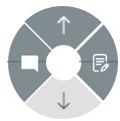
Actions available on the object have a dark gray background.
Actions not available on the object have a light gray background.
2. Click:
•  to access the object properties.
to access the object properties.•  to add a review note to an object.
to add a review note to an object.See Review Notes.•  to access the diagrams containing the object
to access the diagrams containing the object•  to access the diagrams describing the object
to access the diagrams describing the object