Describing Batch Processing
With HOPEX IT Architecture, you can describe the sequencing of automated processing in batch planning structure diagrams.
 To access UML functions, you must be connected Solution Architect profile or with Solution Architecture Functional Administrator profile.To see the Batch Processing, open the Options window and check that IT Architecture > User Interface and Batch Features (ADES) option is activated.
This type of diagram is used to represent the execution schedule for batches, batch programs and their organization.
Defining a Batch Process
A batch processing is a set of IT processing operations executed by a computer without human intervention, generally overnight or at the weekend.
A batch process is described by a batch planning or a Program.
 A batch planning defines all the IT processing operations to be executed on one or several machines over a given time period.A program is an elementary stage in execution of a batch planning that consists of running execution of a program using the appropriate parameters.
A batch planning is a set of batch processes. Each is associated either with a program or with another batch planning. A batch planning is described by a batch planning structure diagram.
For further details, see Building a Batch Planning Structure Diagram.A program is a set of batch processes. Each of these can be associated with a single program. A program is described by a batch program structure diagram.
For further details, see Creating a Batch Program Structure Diagram.Building a Batch Planning Structure Diagram
A batch planning defines all the IT processing operations to be executed on one or several machines over a given time period.Creating a batch planning structure diagram
The sequencing of automated processes can be described in a batch planning structure diagram.
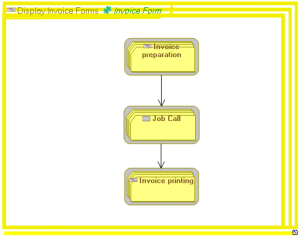
To create a batch planning structure diagram:
1. Click Design (UML) navigation menu.
2. Select Batch and Program Implementation > Batch and Program.
The list of batch plannings appears.
3. Open the Diagrams property page of the batch planning in question and select Create a diagram..
4. Creating Batch Planning Structure Diagram.
The diagram opens.
Adding a call for batch processing in the diagram
The components of a batch planning are defined with batch processing calls that are positioned in the diagram. This can be applied to batch plans or programs.
To add an operating type component to the string structure diagram for batch process:
1. Select the Batch Processing Call button and click in the diagram.
The Add a Batch Processing Call dialog box opens.
2. Click the arrow at the right of the Object Type field and select Batch Planning in the drop-down list.
3. Click the arrow at the right of the Short Name field and select the batch planning that interests you.
4. Click OK.
The call for batch processing appears in the diagram with the batch planning icon.
Defining batch sequencing
To specify the execution order of processes:
1. Click Batch Sequence.
2. Click the initial batch processing call and, holding the left mouse button down, draw a link to the batch processing call.
3. Release the mouse button.
The link representing the sequencing of the processes appears in the diagram.
Creating a Batch Program Structure Diagram
A program is an elementary stage in execution of a batch planning that consists of running execution of a program using the appropriate parameters.Creating a batch program structure diagram
The sequencing of the processes of a program can be described in a batch program structure diagram.
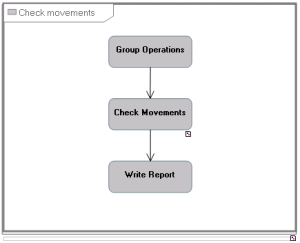
To create the batch program structure diagram:
1. Open the Diagrams property page of the program of your choice and click Create a diagram.
2. In the dialog box, select Batch Program Structure Diagram.
The diagram opens.
Adding a programming call to the diagram
The components of an program are defined with programming calls that are positioned in the diagram.
To add a component to a diagram:
1. Select Programming Call and click in the diagram.
The Add a Programming Call dialog box opens.
2. Click the arrow at the right of the Name field and select the Program that interests you.
3. Click OK.
The program call appears in the diagram.
The execution scheduling of programs is defined by batch sequences, see Defining batch sequencing.
Using system process batch realizations
A realization mechanism is provided to specify that a system process describes the execution of a Batch Planning or a Program.
To describe that an batch plan is associated with an application process:
1. Open the Characteristics > Realization property page of the batch planning that interests you.
2. Click the New button.
The realization creation window opens.
3. In the Object type field, select System process batch realizations and click Next.
4. Select the application process that interests you and click New.
The system process batch realization appears in the properties page of the batch plan.