Describing an Application System Deployment Architecture
An application system deployment architecture is described by an application system deployment architecture diagram composed of the following elements:
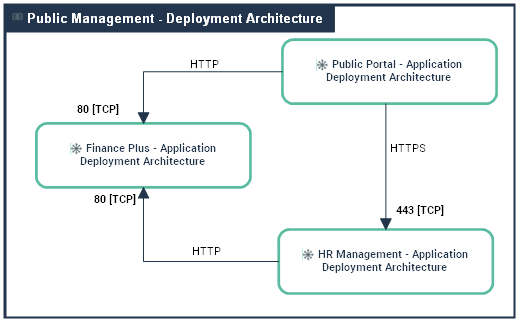
An application system deployment architecture diagram includes the following elements:
• Application Deployment Architecture,
 An application deployment architecture describes one possible deployment configuration of an application. It contains the deployment architectures to be hosted, recommends hosting architectures and identifies required communication techniques (communication protocols and port numbers) they use to communicate with each other. . An application may have several deployment architectures (E.g.: autonomous installation, horizontal or vertical deployment, etc.)
 For more details on application deployment architectures, see Describing an Application Deployment Architecture.
• Application System Deployment Architectures,
An application system deployment architecture describes one of the configurations possible for deploying an application system. It contains the deployment architectures of application components and specifies the communication protocols (and port numbers) they use to communicate with each other.For more details on application system deployment architectures, see Describing an Application System Deployment Architecture.• microservices,
A microservice is a software component that can be deployed autonomously, but which does not directly provide an end user service. It can interact with other application services, applications or application systems. This is a deployable software component that uses software technologies. For example: an authentication service, a PDF file printing service.• Deployable Data Packages,
A deployable data package represents a data part of an application deployment that must be hosted and accessed by application services (code) to run. Each deployable data package is associated to required technologies (for data hosting and access) and can host several data structures. Architect can also prescribes a kind of hosting artefact (IaaS/PaaS cloud service or IT server model). Architect can also prescribes a kind of hosting artefact (IaaS/PaaS cloud service or IT server model).For more details on deployable data packages, see Describing an Application System Deployment Architecture.• Package Connections.
A package connection represents a connection requirement between deployable packages. A client (package) requires a connection to a server (package). The connection is defined by a Connection Type and can be characterized with technical flow measures.• Technical Server Port and Technical Client Port,
A server port is a point used to open communications with a technical architecture or an application technical area in compliance with a particular communication protocol (SMTP, HTTP, etc.).A client port is a point used to request the opening of communications from a technical architecture or an application technical area in compliance with a particular communication protocol (SMTP, HTTP, etc.).You can create an application system deployment architecture diagram is the same way than an application deployment architecture diagram. For further details, see .For further details, see Using an application deployment architecture diagram.Properties of an application system deployment architecture
The complete description of an application system deployment architecture can be accessed from its property pages.
The Components property page of an application system deployment architecture provides access to:
• its Name,
• Its Owner, by default the application specified when it was created.
• the text of its description.
With HOPEX IT Architecture an application system deployment architecture is described by other property pages.
The Components page that enables access to the described architecture components.
For more information on the components of an application system deployment architecture diagram, see Describing an Application System Deployment Architecture.• The Deployment Architecture enables access to the following tabs:
• Application System Deployment Architecture,
An application system deployment architecture describes one of the configurations possible for deploying an application system. It contains the deployment architectures of application components and specifies the communication protocols (and port numbers) they use to communicate with each other.• Deployment Architecture, to access to the list of application deployment architectures,
An application deployment architecture describes one possible deployment configuration of an application. It contains the deployment architectures to be hosted, recommends hosting architectures and identifies required communication techniques (communication protocols and port numbers) they use to communicate with each other. . An application may have several deployment architectures (E.g.: autonomous installation, horizontal or vertical deployment, etc.)For more details on application deployment architectures, see Describing an Application Deployment Architecture.• Owned Microservice Deployment, to access the list of microservices,
A microservice is a software component that can be deployed autonomously, but which does not directly provide an end user service. It can interact with other application services, applications or application systems. This is a deployable software component that uses software technologies. For example: an authentication service, a PDF file printing service.• The Data Packages section provides access to the list of Deployable data packages,
A deployable data package represents a data part of an application deployment that must be hosted and accessed by application services (code) to run. Each deployable data package is associated to required technologies (for data hosting and access) and can host several data structures. Architect can also prescribes a kind of hosting artefact (IaaS/PaaS cloud service or IT server model). Architect can also prescribes a kind of hosting artefact (IaaS/PaaS cloud service or IT server model).For more details on deployable data packages, see Adding a deployable application package in an application deployment architecture diagram.• The Deployment Connections section provides access to the list of connection packages.
A package connection represents a connection requirement between deployable packages. A client (package) requires a connection to a server (package). The connection is defined by a Connection Type and can be characterized with technical flow measures.For more details on connection packages, see Describing package connections.• The Technical Ports section enables access to the following tabs:
• Server Port
A server port is a point used to open communications with a technical architecture or an application technical area in compliance with a particular communication protocol (SMTP, HTTP, etc.).• Client Port
A client port is a point used to request the opening of communications from a technical architecture or an application technical area in compliance with a particular communication protocol (SMTP, HTTP, etc.).For more details on technical ports, see Adding technical ports.The Reports page, used to access the different reports available on the described application system deployment architecture.