SV-6 Systems Data Exchange Matrix
SV-6 Description
|
SV-6
|
SV-6 Systems Data Exchange Matrix
|
Provides details of system resource flow elements being exchanged between systems and the attributes of that exchange.
|
For a more detailed description see the DoDAF web site: SV-6: Systems Data Exchange Matrix.
SV-6 HOPEX Implementation
 The objects found here are also available from the SV-1 view (Flow Scenarios and Environments tile).
In this view you can find the different kind of system-related scenarios:
• scenarios of application system environment flows
• scenarios of application system flows
• scenarios of system environment flows
• scenarios of system flows
A scenario of system flows presents the flow exchanged between the IT services or the microservices used by this system. The scenario can represent a specific use case of this system or, globally, the set of all flows exchanged inside this system.• scenarios of system of resources
From the pop-up menu of a scenario you can open:
• the flow editor
• the lifeline editor
For more information on scenario editors, see Editing Scenarios. • a diagram for the scenario
System Flow Properties
 A system flow represents a piece of information flowing between systems or inside a system. A system flow can carry a content.
The following properties are available on system flows (in the Flow Properties section). They enable to enrich their description and categorization.
These properties can also be entered through the flow editor. The editor tool enables you to:• create flows,
• set values on their properties
• map the flows with activities
You can view these properties in the flows report. For more information, see System Resource Flow Matrix.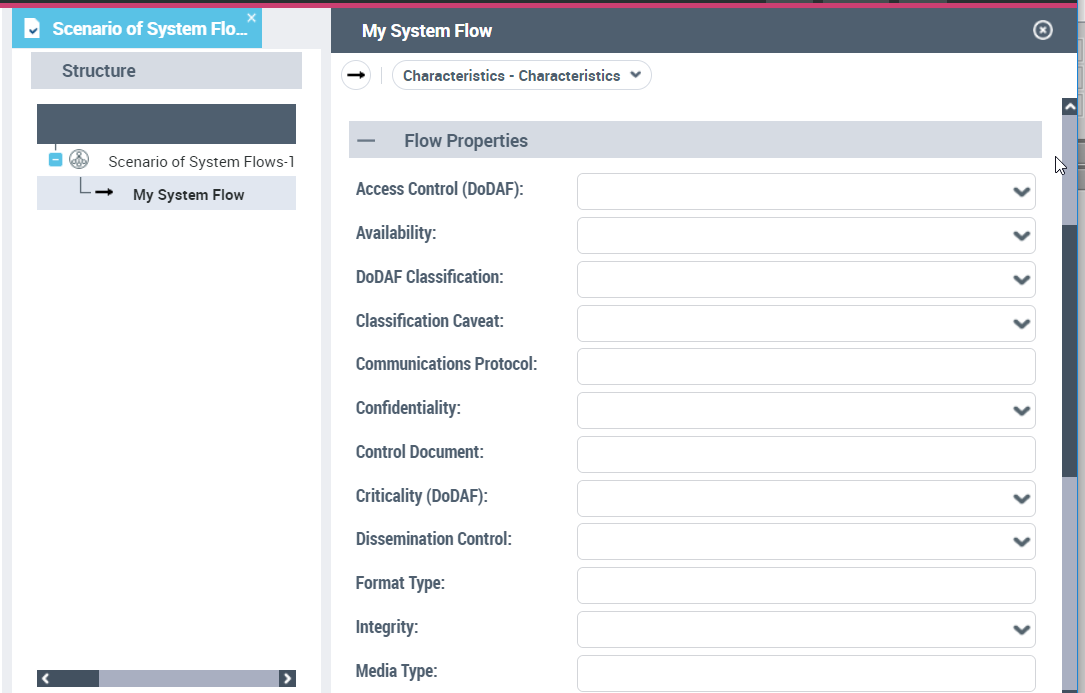
Access Control
• Not Required
• Profile
• Password & ID
• ID Cert/ACL
• Crypto Ignition Key (CIK)
• Pairwise Key
• Transport Layer Security (TLS)
Availability
• Low: Best effort to meet Resource Flow timeliness requirements with the resources that are available.
• Medium: Specific resources have been allocated to ensure Resource Flow timeliness requirements are met
• High: Pre-emptive resource allocation to meet Resource Flow timeliness requirements.
• Not specified
• Not known
Classification
• No Classification
• Unclassified
• FOUO
• Sensitive but Unclassified
• Confidential
• Secret
• Secret restricted
• Top secret
• Above top secret
Classification caveat
• Admin or Operational use data
• Critical technology
• Contractor performance evaluation
• Direct military support
• Foreign government information
• Preclude premature dissemination
• Proprietary information
• Software documentation
• Specific authority
• Test and evaluation
• Not specified
• Not known
Communications Protocol
Confidentiality
• Unavailable: Used in those "As-is" circumstances where there is no capability to provide confidentiality for the Resource Flow
• Not required: For unclassified, un-caveated, public information
• Clearance: An appropriate clearance for the level of classification of the information is required to access the Resource Flow.
• Need-to-know: A determination that the individual needs the Resource Flow and is authorized to use it is made before access is granted. If the Resource Flow is classified, Need-to-Know also implies the individual has the appropriate clearance.
• Not Specified
• Not Known
Control document
Criticality
• Force C2
• Mission Operations
• Core Functions
• Not Otherwise Stated
• Logistics
• Admin
• Mission Essential
Dissemination control
• Public
• Private
• Controlled
• Restricted
• Not specified
• Not known
Format type
Integrity
• Unavailable
Even though checks for integrity may be desirable, the capability to accomplish such checks is not currently available.
• Not Required
This Resource Flow and its uses do not call for the effort to check on integrity (i.e., An integrity check would not be required for printed copy of the Stars & Stripes or information transiting the Joint Worldwide Intelligence Communications System/Service (JWICS) is assumed to be safe, and no integrity check is required).
• Discretionary
The decision on whether checks for integrity are to be accomplished is based on local decision
• Mandatory
Checks for integrity are required
• Not Specified
• Not Known
Media Type
Non-repudation customer
• Required
• Not required
Non-repudiation producer
• Required
• Not required
Periodicity
Protection
• None
• Encrypted for Transmission Only (EFTO)
• Originating Agency Determination Required (OADR)
• Until Specified date (state the date)
• Until End of Mission
• For specified duration (state the # days)
Releasability
Security standard
Size
Throughpout
Timeliness
• Real-Time
• Near-Real-Time (Less Than 1 Second)
• Moderate (1-10 Seconds)
• Slow (10 Seconds -10 Minutes)
• Up to one hour (10 minutes - 1 hour)
• Up to 8 Hours (1 Hour -8 Hours)
• Up to one day (8 hours - 24 hours)
• Up to one Month (1 Day -30 Days)
• Large
• Greater than One Month
• Not Known
• Not Specified
System Resource Flow Matrix
A system resource flow matrix enables you to view flows exchanged in the different system scenarios with the indication of the sender, the recipient and the context.
To access the system resource flow matrix:
 From the navigation menu, select Services Viewpoint > SV-6 System Resource Flow Matrix > SV-6 System Resource Flow Matrix.It is similar to the matrix found in the Svc-V6.For more information about flow properties, see System Flow Properties.
System Resource Flow Reports
You can create your own scenario report, and customize it by selecting the scenarios and environment scenarios of interest to you and modifying the default parameters.
To create your scenario report:
1. In the navigation menu, click Systems Viewpoint > SV-6 Systems Resource Flow Matrix > Systems Resource Flow Reports.
2. Click New.
3. In the wizard select the scenarios of interest to you.
You can also choose to include operational scenarios in this report.