Data Types and Column Datatypes
Not all data has the same value type. Datatype determination enables indication of format and therefore facilitates handling by the different data processing tools.
HOPEX manages datatypes at different modeling levels, assuring correspondence of datatypes at the logical level with datatypes handled by the different supported DBMSs.
Attribute Datatypes
A type is used to group characteristics shared by several attributes.
To type attributes of an entity, only those datatypes defined for the data model that contains this entity are proposed.
 A data model is used to represent the static structure of a system, particularly the types of objects manipulated in the system, their internal structure, and the relationships between them. A data model is a set of entities with their attributes, the associations existing between these entities, the constraints bearing on these entities and associations, etc.
For more details on data types and reference data type packages, see Datatypes.
Determining Column Datatypes from Attribute Types
Datatypes defined at the logical level level are not always comprehensible for the target DBMS. In this case, they need to be converted to datatypes corresponding to the target DBMS.
This conversion intervenes notably at synchronization. Datatypes of attributes defined in the logical model are translated to datatypes for the generated columns.
Conversion is assured by an equivalence link with pivot types. The pivot types are an intermediary between logical datatypes and generated datatypes.
Pivot Types
Pivot types are datatypes defined independently of the target DBMS, which you can use when you do not yet know the system in which the database will be hosted, or when several systems may be used.
Pivot types have an equivalent datatype in each supported DBMS. They therefore enable you to define the attribute types just once, then to reinterpret them later as a function of the target DBMS.
To use the datatypes of a DBMS, you must import the corresponding module. See Importing a DBMS Version.
List of pivot types
Once imported, the pivot types are available in the Logical data navigation pane, in the "Pivot" datatype package.
|
Alphanumeric types
|
|
Other Information
|
|
P-String
|
Alphanumeric character chain
|
|
|
P-Text
|
Alphanumeric character chain
|
|
|
P-Character
|
Alphanumeric string of fixed length
|
Length
|
|
P-Varchar
|
Alphanumeric string of variable length
|
|
|
Numeric types
|
|
|
|
P-Decimal
|
Decimal
|
|
|
P-Double
|
|
|
|
P-Float
|
|
|
|
P-Integer
|
Short
|
|
|
P-Long Integer
|
|
|
|
P-Long Real
|
|
|
|
P-Real
|
|
|
|
P-Smallint
|
|
|
|
P-Tinyint
|
|
|
|
P-Numeric
|
Number
|
Length, decimal places
|
|
P-Currency
|
Amount expressed as currency
|
Length, decimal places
|
|
Date types
|
|
|
|
P-Date
|
Date
|
|
|
P-Time
|
Time
|
|
|
P-DateTime
|
Date and time
|
|
|
Binary types
|
|
|
|
P-Binary
|
Binary string
|
|
|
P-Byte
|
Binary string
|
|
|
P-Timestamp
|
Identification automatically generated from the date and time, expressed in thousandths of seconds since 01 January 1970
|
|
|
P-Boolean
|
Boolean, equals 0 or 1
|
|
|
P-Multimedia
|
Binary string
|
|
|
P-Varbinary
|
Binary string
|
|
Connecting a Datatype to a Pivot Type
Datatypes contained in the "Datatypes Reference" package and associated by default with all new data models are connected to these pivot types. Therefore when you create new datatypes, these must be connected to the corresponding pivot types so that they can subsequently be used at physical level.
To connect a datatype to a pivot type:
1. Open the properties of the datatype.
2. Click the Characteristics page.
3. In the SQL Datatype field, select the pivot type.
Take the "Code" datatype. Open its properties dialog box and click the Characteristics page. In the SQL Datatype field, you can see that it is connected to the "P-Character" pivot type .
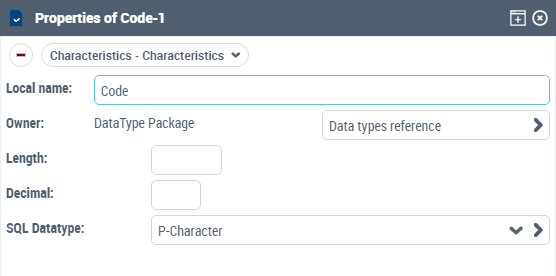
At synchronization of a logical model to a physical model, this pivot type "P-Character" will give a datatype CHAR, VARCHAR, LONG or TEXT depending on the DBMS concerned by synchronization. You can modify the target DBMS without having to modify the datatype, HOPEX assuring automatic conversion.
Connecting a Datatype to a Pivot Type in UML Notation
If you use UML notation and class diagrams to modify your data - and for reasons of compatibility with earlier versions of HOPEX Database - other methods of referencing pivot types are possible.
 For more information on the storage directory, see The Class Diagram.
You can create new datatypes and connect them to pivot types:
By inheritance
You can define your own datatypes by declaring them as subclasses of the pivot types, .
The datatypes defined as subclasses will automatically inherit the characteristics of their superclass. In particular, the datatype conversion rule for the superclass is applied to the subclass.
It is possible to specify a length and a number of decimal places for the subclass. These will be taken into account when generating the data types if they were not already defined for the superclass.
By a correspondence link
To create this link:
1. Open the properties dialog box of the class.
2. Click the Generation > SQL page.
3. Indicate the SQL Type associated with the class.
 Only pivot types of the Standard::Types::Pivot package are proposed in the list.
4. You can also indicate the length and the number of decimal places to be applied.
By creating a compound datatype
You can define a compound datatype by assigning to it a list of attributes.
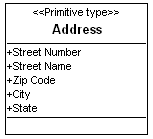
Here the "Address" type is composed of the number, street, zip code, city, and country.
The derivation of the "Address" attribute will produce these five columns.
It is possible to have several levels of compound types by assigning a compound type to an attribute of a compound type.
For example, the zip code can be broken down into the main five digits and the four-digit extension: