Reusing Regulation Data
If your repository contains regulation frameworks or requirements, you need to convert them to be able to reuse them in HOPEX GRC.

|
Source object type
|
Object type obtained after conversion
|
|---|---|
|
Regulation
Framework |
Regulatory framework
|
|
Requirement
|
Article + Control directive
|
 For more details on regulatory frameworks, see Managing the Compliance Register.
Converting Regulation Data
To convert regulation frameworks and requirements:
1. From the navigation bar, select Administration > Tools > Regulation Data Conversion.
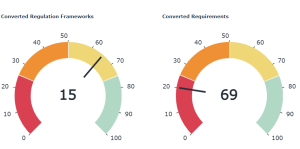
Gauges indicate the percentage of regulation frameworks and requirements which have been converted so far.
2. Click Launch Data Conversion.
3. In the Convert into column, indicate for each regulation framework if you want to:
• convert it into a regulatory framework
• convert it into a business policy framework
• do not want to convert it
Regulation Frameworks are by default converted into Regulatory Frameworks. The Apply Default Conversion Settings button enables to revert to the initial settings in case you made changes.At the end of the conversion, the gauges display an updated percentage.
Converted data can be viewed in the compliance register (Compliance menu). For more details, see Managing the Compliance Register.
The regulation framework date is not converted. Moreover, customized characteristics are not converted either.