Risk Profile Analysis by Context
The report displayed in the form of a dashboard enables to identify risks. It displays the distribution of risks according to several perspectives: by process, by risk type, by entity and by objective.
Access path
Navigation bar > Reports
Report parameters
This consists of selecting risks that will be presented by specifying elements that define their scope: risk types, entities, processes or objectives.
|
Parameters
|
Parameter type
|
Risk selection criterion
|
|---|---|---|
|
Begin Date
|
Date
|
Not mandatory.
|
|
End date
|
Date
|
Current date by default
|
|
Scope risk type
|
Risk type
|
Not mandatory.
|
|
Scope entities
|
entity
|
Not mandatory.
|
|
Scope processes
|
process
|
Not mandatory.
|
|
Scope objectives
|
objectives
|
Not mandatory.
|
Report content
The higher part displays the distribution of risks:
• By process (assessed/not assessed)
• By risk type (assessed/not assessed)
• By entity (assessed/not assessed)
• By objective (assessed/not assessed)
• By status (created, submitted, validated, rejected)
The lower part of displays the distribution of risks based on the following criteria:
• Risk treatment (risks with/without controls)
• Risk assessment (assessed/not assessed)
• Risk declaration per year
Examples
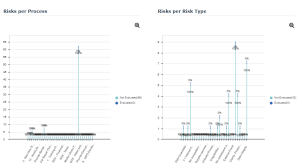
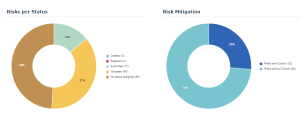
To obtain a list of risks making up a sector or a barchart bar:
 Click the sector (or barchart bar) that interests you.
The list of risks taken into account is presented at the bottom of the edit area.
 For more details on instant reports, see HOPEX Common Features.