Incident Impacts
This report is displayed in the form of a dendrogram illustrating the impacts of an incident.
 For general information on incidents, see Collecting Incidents.
Access path
To access this report:
1. In the navigation bar, select Incidents.
2. Open the incident properties and in the Reporting page, select Incident Impacts.
Illustration
Dendrogram
Report parameter
|
Parameter
|
|---|
|
1 Incident
|
Report content
This report indicates:
• Action Plans, ongoing or completed
• the Causal analysis (risk factors and consequences)
• the Materialized risk, with information about the last assessment
• the Failed control, with information about the last assessment as well as action plans
• Impacted elements
• Entity
• Process category
• Processes
• Application
• Technology
• Server
• Site
• Data center
• Facility
• Business line
• Product
Report example
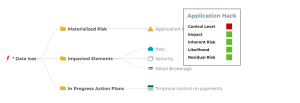 When hovering the mouse over the impacted elements, you can view information about them if available.