Viewing a BIA Computed Results
 See the previous step: Performing a BIA.
Once the GRC contributor has filled in the BIA matrix (Business Impact Analysis), the GRC Manager can view results and validate them.
The GRC Manager can modify computed results before validation. For further details, see Adjusting the RTO and Business Impact.To view BIA results:
2. In the BIA properties, select the Results page.
Computed indicators are displayed here:
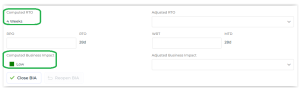
Viewing the Computed RTO
The Recovery Time Objective (RTO) determines the maximum tolerable amount of time it takes to bring critical systems back online, possibly in a Degraded Mode. It is related to downtime, representing target time following an incident for Product or service delivery resumption, or Activity resumption, or Resources recovery.
The RTO displayed is computed from answers given in the BIA matrix.
RTO possible values are the downtime periods defined by the GRC functional administrator.For more details on the algorithm used, see RTO (Recovery Time Objective) Computation. Viewing Computed Business Impact
A business impact is the outcome of a disruption.
The business impact displayed is computed from the answers given in the BIA matrix.
For more details on the algorithm used, see Business Impact Computation.Viewing the MTD (Maximum Tolerable Downtime)
The MTD determines the time necessary for the unfavorable impacts resulting from the non-delivery of a product/service or non-performance of an activity to become unacceptable.
MTD = WRT (Work Recovery Time) + RTO (Recovery Time Objective) MTD = WRT (Work Recovery Time) + RTO (Recovery Time Objective)
The MTD is computed automatically and cannot be modified.
For more details on:• RTO, see:Viewing the Computed RTO
• WRT, see:Entering the WRT (Work Recovery Time)
If the WRT is not specified, MTD = RTO
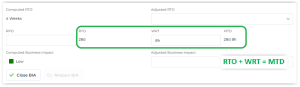 The MTD cannot be modified.