Following up Recommendation Implementation
When the recommendation has been validated, actions are implemented by the auditees.
Following up recommendation progress
After a predetermined period, the audit director or lead auditor can request information on progress of recommendations.
The audit director can consult the list of recommendations of an audit plan in the Recommendations page of the audit plan. A Follow-up check box indicates recommendations that are linked to a follow-up audit.
Viewing the recommendation report
A report enables to ensure the follow-up of recommendations. The audit director or GRC functional administrator can access this report.
To create a recommendation report:
1. In the navigation bar, click Reports then Create a Report.
2. Filter the report template by object type (here “Recommendations”).
3. Create a Recommendation Follow-Up Report.
4. In Parameters, connect the objects of interest:
• Audit plans
• Audits
• Process categories and processes
• Risks
• Entities
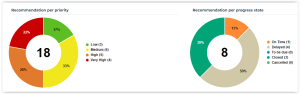
You will see:
• Recommendations breakdown by priority
• Recommendations breakdown by progress (delayed, etc.)
Viewing the recommendation dashboard and identification card
The Overview property page of a recommendation displays the main indicators of the recommendation progress in the form of a dashboard.
 This page also displays information about the recommendation in the form of an identification card.
 The dashboard values are retrieved from the Action Plan Progress History section of the recommendation (Action Plan page).
• Progress: value of the Progress (Percentage) column of the last progress update.
• Timing: value of the Progress Evaluation column of the last progress update.