Core Concepts
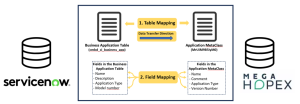
In the module interface, you can configure mappings by setting up:
1. The objects to synchronize between HOPEX and ServiceNow (e.g. Applications) through a Mapping of tables.
The following information must therefore be defined:
• the HOPEX MetaClass and the ServiceNow table in which the objects are stored
 If needed, see Exploring ServiceNow's data model from HOPEX.
• the direction of data transfer (bidirectional is possible)
• the synchronization mode (preserving or deleting objects from the target system)
2. The fields to synchronize along with the objects (e.g. name, description and version number of the Applications) through field-level mappings.
Exploring ServiceNow's data model from HOPEX
You can explore ServiceNow tables and fields from HOPEX.
To do so:
1. In the menu, click Explore SNow.
2. Select a ServiceNow table.
3. Click Explore selected table.
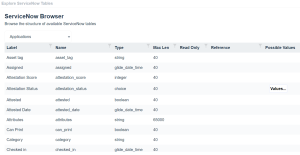
A table appears and shows all the fields and their characteristics (type, maximum length, possible values, etc.) for a given object type in ServiceNow.
 You can filter the results via the column headers
  .
.