Describing a Capability Map
A capability map describes what the enterprise is capable of producing for its internal needs or for meeting the needs of its clients. It is thus based on the main Capabilities of its activity at a given moment.
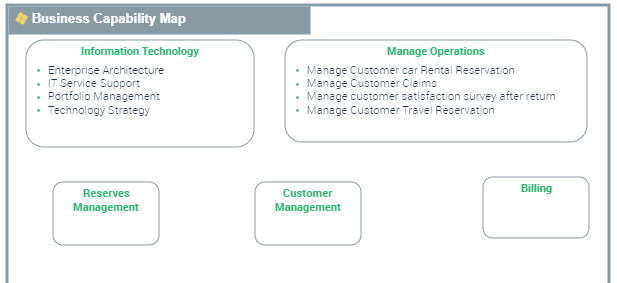
Accessing capability maps
To access Capability maps:
1. From the Strategic navigation menu, select Taxonomy - Structure.
2. Click the Capability Maps tab.
The list of the Enterprise Capability maps is displayed.
Creating a capability map
To create a Capability map:
1. From the Strategic navigation menu, select Taxonomy - Structure.
The list of capability maps appears.
2. Click New.
A creation dialog box opens.
3. Specify the Name and click OK.
The new capability map appears in the list.
Properties of a capability map
The Characteristics properties page of the capability map provides access to:
• its Owner, by default on creation of the capability map, the current enterprise.
• its Name,
• the text of its Description,
• the Capability Asset Category. The proposed values are:
• GDPR,
• Operational,
• Steering,
• Support.
You can describe a capability map as follows:
• the Structure page is used to specify
• the list of Capability components (compositions) that constitute the Capability map described.
 You can only create capability components. You cannot reuse them. See Using the capability components
• the dependencies between these components,
For more details on capacity structure, see Defining Capability dependencies.• The Fulfillments page provides access to the components realizing the Capability map.
For more details on capacity fulfillment, see Capability Fulfillment.• the Diagram page is used to access or to create Capability Maps diagrams.
For more details, see Creating a Capability Structure diagram.Creating a Capability Decomposition Tree diagram
A Capability Decomposition Tree, this diagram describes the tree structure of a Capability or a Capability map. Focusing on a particular Capability, this type of diagram enables summary representation of Capability breakdown into sub-Capabilities.
Creating a Capability Structure diagram
Using the capability components
The components represented in a Capability map diagram are Capability Components. Each capability composition is associated with a Capability.
 A Capability component is the involvement of a Capability in the context of a Capability map (one and only one) linked to an enterprise.
To add a Capability composition to a Capability map diagram:
1. In the diagram insert toolbar, click Capability Composition.
2. Click in the frame of the Capability map.
The creation window for a capability composition opens.
3. Click on the arrow associated with the Name field and select the Capability that interests you.
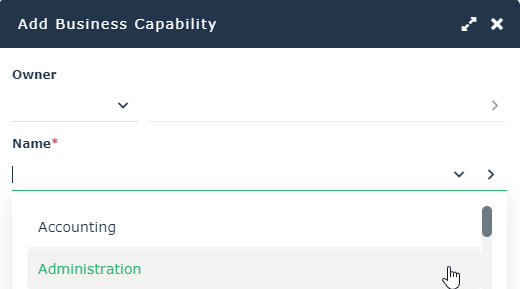
4. Click OK.
The capability composition appears in the diagram.
If the Capability is associated with functionalities, they also appear. For more details on the capabilities and functionalities associated with Capabilities, see Defining the business skills and functionalities associated with Capabilities.Defining Capability dependencies
A dependency link between one capability composition and another is used to specify the elements on which this dependency is based.
For example, “Billing” uses “Order Management”. Note that the expected result (business effect) of "Billing" is an "Invoice" and the expected result (business effect) of "Order Management" is a "Order to be delivered".
A single capability composition can have more than one dependency within a single diagram.To create dependency links between two capability compositions:
1. In the insert toolbar, click Capability Dependency.
2. Click the user component, and keeping the left mouse button pressed, move the cursor to the assembly used.
3. Release the mouse button.
The capability composition appears in the diagram.
To enter the results concerned by a dependency between two Capability components:
1. Open the Characteristics properties dialog box.
2. Enter the user component result in the Dependent Business Effect field.
For example, “Invoice”.
3. Fill the Desired Business Effect field with the result of the component used.
For example, “Order to be delivered”.
Capability Map Reports
Two reports are available for a Capability Map:
• a dendrogram illustrating the environment of the Capability Map.
For more information about the use of a Treemap, see Handling a Dendrogram.• a breakdown analysis report.
For more details on the breakdown map of Capabilities, see The Breakdown Report of Capabilities.