Accessing Enterprise Diagrams
Quick Access contains shortcuts facilitating your work in HOPEX UAF.
 For more details on Quick Access, see Quick Access Action.
This shortcut provides access to the following Enterprise diagrams:
Creating an Enterprise Strategy Diagram
The enterprise strategy diagram describes the links between missions, goals, strategies, tactics and exhibited Capabilities.
To draw this diagram:
1. Select the enterprise and click New > Diagram.
2. Select Enterprise Strategy Diagram.
You can also create this type of diagram from an Enterprise Stage.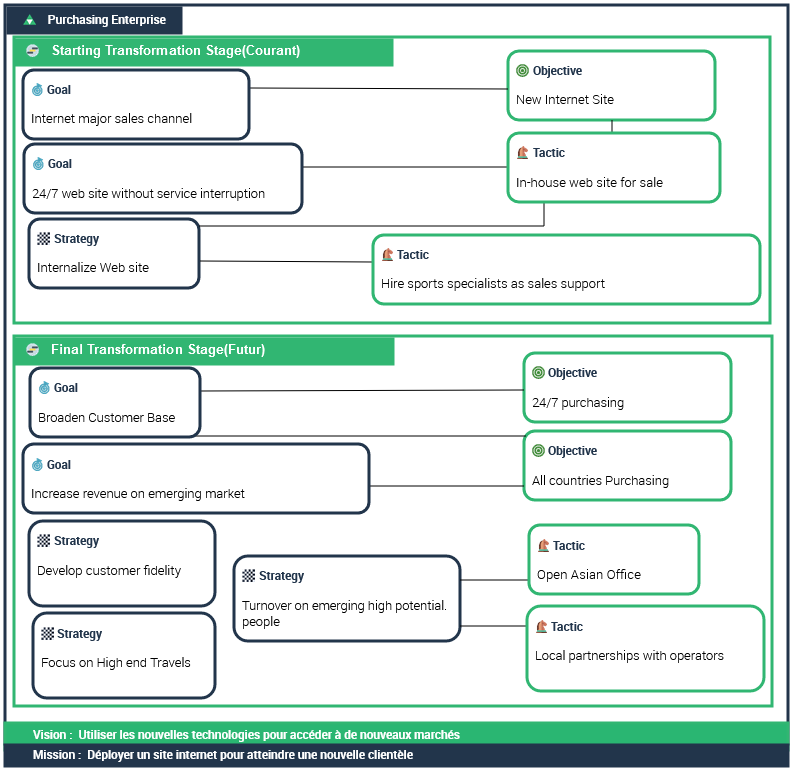
The components represented in an enterprise diagram are the strategic elements connected to the enterprise and to its Transformation stages.
For further details, see Defining Enterprise strategic elements.The components represented in an enterprise diagram are :
• The enterprise ends, described by the enterprise goals and the enterprise objectives (that are described at the transformation stages)).

• The enterprise means that are described by strategies at the enterprise level and by tactics at the transformation stage level.