Using your implementation from the MEGA Renderer Macro
Compile
In order to use your Java Report Renderer it must be exported in a .jar in the java/lib directory of your MEGA installation.
Compilation of the Java component in the form of a JAR file is via the "Export" menu of the Java project:
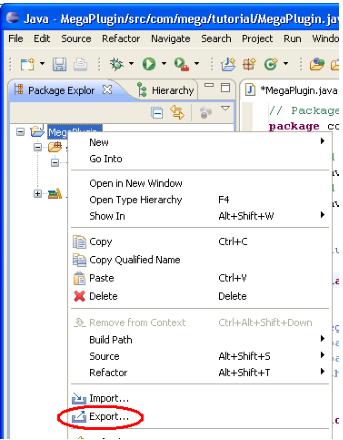
A JAR can contain as many Java Renderer implementing classes as you wish.
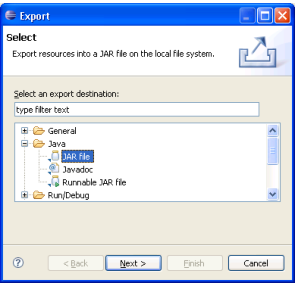
"JAR File" export in the Java directory should be selected:
Indicate the location of the JAR file to be generated and click "Finish":
The JAR file must be generated (or copied after generation) in the "java\lib" directory of the MEGA installation site.
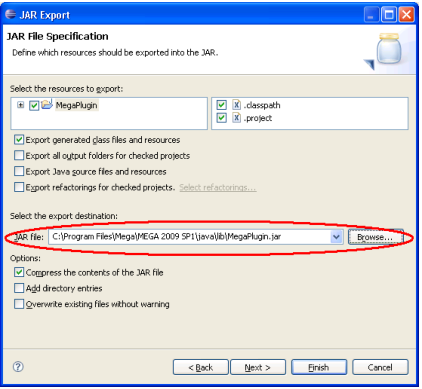
The name of the JAR file itself is not significant; you should use a name that makes sense in your project.
Configuring the macro
Once you have added the JAR file to the “java\lib” directory, restart Mega and edit the properties of your renderer macro in order to reference your Java class.
In the macro properties dialog box, assign the "Dispatch" value to the "SystemComponent" attribute, then specify the "_ObjectFactory" attribute using the renderer Java class. For exemple, the value "java:com/mega/tutorial/MegaPlugin" identifies the "MegaPlugin" class of the "com.mega.tutorial" package.
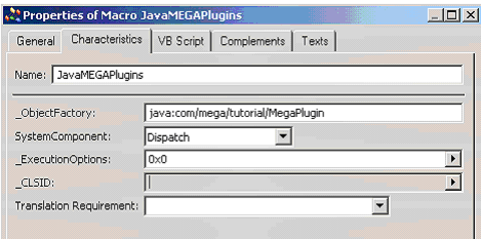
The VB Script of the macro should be kept empty.