Accessing the GraphSet Definitions
You can access:
• all (provided and custom) GraphSet Definitions
They are displayed as a tree.
You can display them in:
• the Edit area, especially to work with a specific GraphSet Definition
• the Browse area, so as to keep a global view of all the GraphSet Definitions in the Browse area while displaying the properties of one of them in the Edit area.
• custom GraphSet Definitions only
They are displayed as a list.
Custom GraphSet Definitions are the GraphSet Definitions not provided with HOPEX.
Accessing all the GraphSet Definitions
You can access the tree of all (provided and custom) GraphSet Definitions.
To access the GraphSet Definitions:
1. Connect to HOPEX Report Studio desktop.
2. From the navigation menus, click Report Definitions > Data Source definitions.
 Click Report Definitions > Data Source Definitions
  to display the tree in the Browse area.
3. Display the GraphSet Definition page.
The tree displays all the GraphSet Definitions (custom and provided with HOPEX).
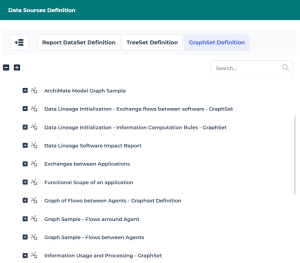
4. (If needed) Use the Search field to access a specific GraphSet Definition.
Click the GraphSet Definition, to display its properties.Accessing the custom GraphSet Definitions
Custom GraphSet Definitions are the GraphSet Definitions not provided with HOPEX.
You can access the list of:
• all the Custom GraphSet Definitions
• only your Custom GraphSet Definitions
To access custom GraphSet Definitions displayed as a tree, see Accessing all the GraphSet Definitions.
To access the custom GraphSet Definitions:
1. Connect to HOPEX Report Studio desktop.
2. In the Home page, My Scope part, to display:
• your custom GraphSet Definitions only: in My Work, click My GraphSet Definitions indicator
• all custom GraphSet Definitions: in Customizations, click Custom GraphSet Definitions indicator
The corresponding list of custom GraphSet Definitions displays.
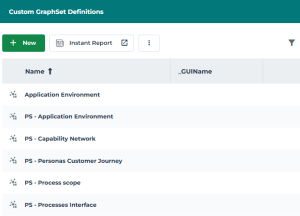
3. (If needed) Use the list filtering tool to access a specific custom GraphSet Definition.
Click the custom GraphSet Definition, to display its properties.Displaying the GraphSet Definition properties
To display the GraphSet Definition properties:
1. Access the GraphSet Definitions.
2. Click the GraphSet Definition name.
The GraphSet Definition properties display.
Displaying the GraphSubSet properties
To display the GraphSubSet properties:
1. Access the GraphSet Definitions displayed as a tree.
2. Expand the GraphSet Definition concerned and its GraphSubSet folder.
The GraphSubSet included in the GraphSet Definition available are accessible.
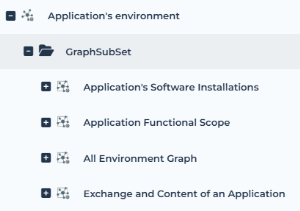
3. Click the GraphSubSet concerned.
 Hover the cursor over the name and click Open in a new tab
  to open the properties in a new tab.
The GraphSubSet properties are displayed.
Displaying the GraphSet arc/node properties
To display the GraphSet arc/node properties:
1. Access the GraphSubSet concerned displayed as a tree.
2. Expand the GraphSet Node Definition folder.
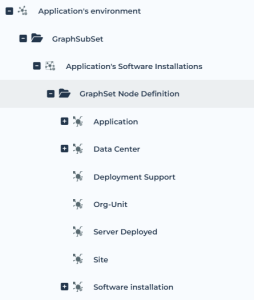
3. Click the node  concerned.
concerned.Its properties are displayed.
Hover the cursor over the node and click Open in a new tab to open its properties in a new tab.4. Expand a node with a  to access its arc(s).
to access its arc(s).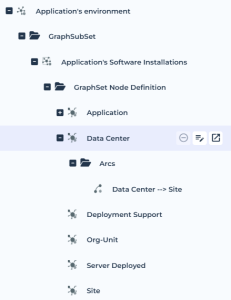
5. Click the arc  concerned.
concerned.Its properties are displayed.
Hover the cursor over the arc and click Open in a new tab to open its properties in a new tab.