5. Object pages details
5.1. Overview
An Object page is broken down into:
• A breadcrumb on top, showing the hierarchical structure
• A sections menu, allowing quick access to relevant data:
The sections:
o Identity: this section displays key attributes
o Specific sections showing key links around a given object

5.2. Business Information Map
|
Section
|
Key information
|
|
Identity
|
Name
Vision
Mission
Table showing the Theme Goal and Strategy
Business Capability Map
|
|
Diagram
|
Enterprise Diagram
|
|
Transformation Stage
|
One sub tab per Transformation Stage showing
- Name
- Comment
- Goal / Objective and Tactic
- Projects
|
|
Reports
|
- TreeMap
- Box in Box
- Chord
|
5.3. Business Capability Map
|
Section
|
Key information
|
|
Identity
|
Name
Comment
|
|
Diagram
|
Describing diagram
|
5.4. Business Capability
|
Section
|
Key information
|
|
Identity
|
Name
Release Date
Validation State
Comment
|
|
Diagram
|
Describing diagram
|
|
Owner Business Capability / Map
|
Parent BCM or
Parent Business Capability
|
|
Functionality
|
Functionality attached to the Business Capability
|
|
Application System
|
Application system supporting the Business Capability
|
|
Application
|
Application supporting the Business Capability
|
5.5. Process Category
|
Section
|
Key information
|
|
Identity
|
Name
Code
Parent (link to the Parent Process Category)
Comment
Status
Release Date
|
|
Diagram
|
Describing diagram
|
|
Owner
|
Person linked to Process Category
|
|
Sub-process
|
Component of the Process Category
|
|
Application
|
Application supporting the Process Category
|
5.6. Process
|
Section
|
Key information
|
|
Identity
|
Name
Parent (link to the Parent Process)
Comment
Status
Modification Date
|
|
Diagram
|
Describing diagram
|
5.7. Concept
|
Section
|
Key information
|
|
Identity
|
Name
Comment
|
|
Store
|
Application store recording the Concept
|
|
Application Flow
|
Application flow carrying the Concept through Business Work Product
|
5.8. Business Information Map
|
Section
|
Key information
|
|
Identity
|
Name
Comment
|
|
Reports
|
- TreeMap
- Box in Box
- Chord
|
5.9. Application portfolio
|
Section
|
Key information
|
|
Identity
|
Name
Comment
|
|
Applications
|
Application grouped into the Portfolio
|
|
Lifecycle
|
Gantt chart of all Application lifecycles of the considered portfolio
|
5.10. Technology portfolio
|
Section
|
Key information
|
|
Identity
|
Name
Comment
|
|
Technologies
|
Technologies grouped into the Portfolio
|
|
Lifecycle
|
Gantt chart of all Technologies lifecycles of the considered portfolio
|
5.11. Application
|
Section
|
Key information
|
|
Identity
|
Name
Comment
|
|
Diagram
|
This section shows:
- First the Impact Force diagram, which is auto generated. This relies on:
o The JSON generated against each App
o The use of a webserver such as IIS
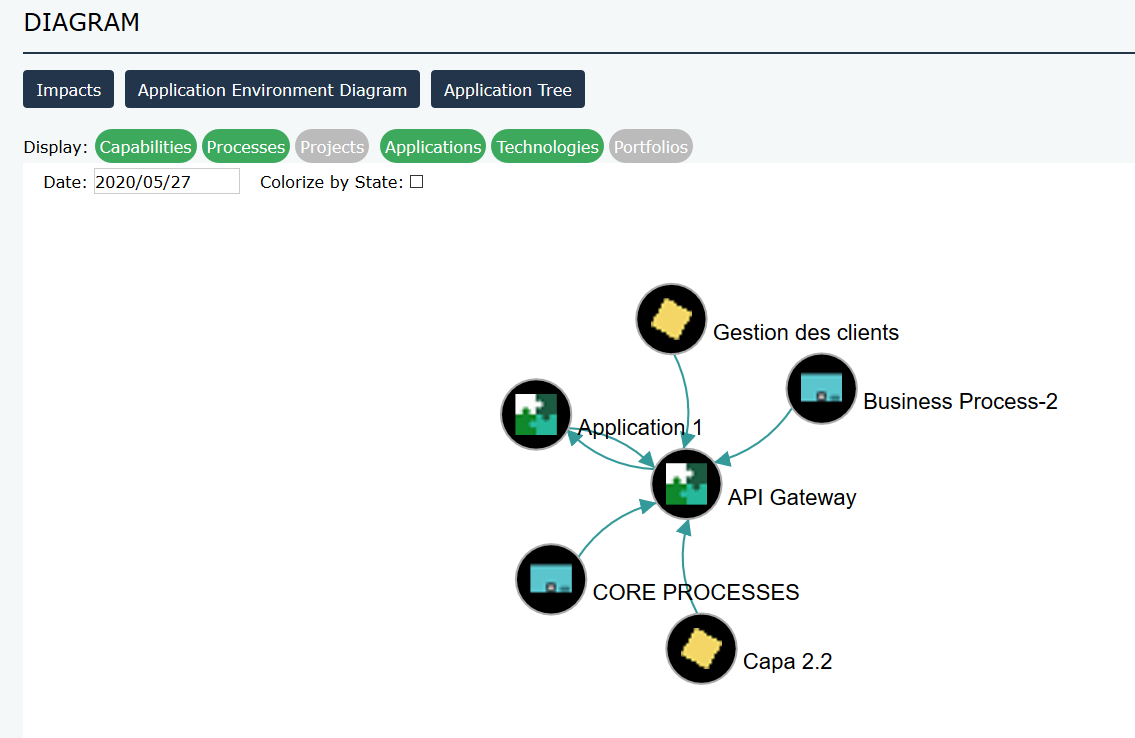 - A tab per Diagram attached to the App
|
|
Owner
|
Responsibility Assignments and the relevant users
|
|
Business Capability
|
Business Capabilities supported by the Application
|
|
Process Category
|
Process Category supported by the Application
|
|
Project
|
Projects impacting the Application
|
|
Version
|
Versions of the Application, which means Applications linked via the Variations mechanism
|
|
Interface
|
List of sent and received application flows
|
|
Data Store
|
Data stores touched by the Application
|
|
Functionality
|
Functionalities offered by the application
|
|
Technologies
|
Technologies grouped into the Portfolio
|
|
Lifecycle
|
Gantt chart of all Technologies lifecycles of the considered portfolio. Standard HOPEX Report
|
|
Technology conflict
|
Gantt chart highlighting the conflicts between the lifecycles of the Application and its supporting Technologies
|
5.12. Project
|
Section
|
Key information
|
|
Identity
|
Name
Comment
|
|
Deliverables
|
List of all deliverables provided by the Project and their Impact
|
5.13. Technology
|
Section
|
Key information
|
|
Identity
|
Name
Code
Company Standard
Vendor (link to the Org Unit typed Vendor)
Type (link to the _Type)
Comment
|
|
Owner
|
Person linked to the Technology
|
|
Lifecycle
|
Lifecycle of the Technology
|
|
Using Application
|
Applications supported by the Technology
|
5.14. Vendor
|
Section
|
Key information
|
|
Identity
|
Name
Email address
Comment
|
|
Technologies
|
List of all technologies provided by the Vendor
|