Creating a MetaAttribute
To create a MetaAttribute:
1. Open the Properties window of the MetaClass or MetaAssociationEnd.
2. In the MetaAttribute tab, click New  .
.
.The new MetaAttribute is created and appears in the list.
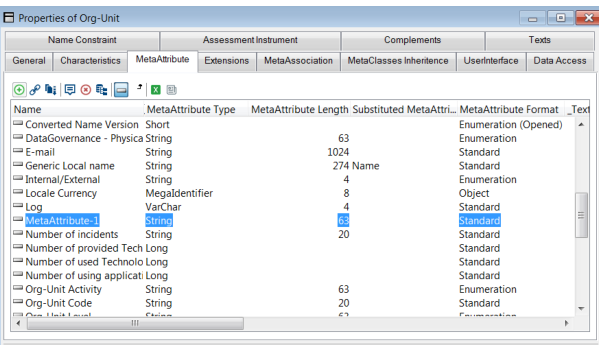
 When a MetaClass is created, it is automatically assigned the “Name” and “Comment” attributes.The "Absolute identifier", "Authorization", "Creator Name", "Creation Date", "Modifier Name", and "Modification Date" attributes are also available automatically when an object type is created. The names of the attributes that can be used in queries are limited to 32 characters.
3. In the MetaAttribute Type field, select the attribute type.
By default the MetaAttribute Type value is "String" with a MetaAttribute Length value set to "63".See MetaAttribute Type. Once dispatched, you cannot change the MetaAttribute Type value (see exceptions: Modifying a MetaAttribute Type).
 4. In the MetaAttribute Format field, select the attribute format.
See MetaAttribute Format.5. (Mandatory for "X"-type or "Q"-type MetaAttribute) In the MetaAttributeLength field, enter the attribute length.
Once dispatched, take care not to modify the length with a value lower than the initial value. Modifying a MetaAttribute Type
If needed, you can change MetaAttribute types according to the following rules:
• for dates:
• DateTime to DateTime64 or AbsoluteDateTime64
• AbsoluteDate64 to DateTime64
• DateTime64 to AbsoluteDate64
• for numerical values:
In that case you need to align data with the new type: perform the Environment automatic update on the environment (else on the repository: RDBMS Administration > Align DataType and Indexes with MetaModel definition). • Boolean to Short, Long, HexaLong, IdAbs, or DoubleFloat
• Short to Long, HexaLong, IdAbs, or DoubleFloat
• Long to HexaLong, IdAbs, or DoubleFloat
• HexaLong to IdAbs or DoubleFloat
• IdAbs to DoubleFloat
• Strings values
• numeric to alphanumeric
• alphanumeric to numeric
Defining a tabulated characteristic
Tabulated characteristic values are saved with the technical data.A tabulated characteristic is a characteristic associated with a series of tabulated values, such as Information-Class, Org-Unit-Type, and Message-Type.
You can change a standard characteristic (S) to a tabulated characteristic after creation by setting MetaAttribute Format to "Enumeration" (F) or "Enumeration (opened)" (T).
To define a tabulated characteristic :
1. Access the Properties of the MetaClass concerned.
2. Select the MetaAttribute tab.
3. In the MetaAttribute row, in the MetaAttribute Format column, select "Enumeration" or "Enumeration opened" value.
To reverse this characteristic, set the MetaAttribute Format back to "S".The tabulated values associated with the tabulated characteristics are included in the technical data. They can be modified using specialized data entry accessible in the Characteristics tab of the MetaAttribute properties.
When you create a tabulated value, the Administration application automatically generates a name for this value. It should not be modified.
You must indicate the internal value actually stored in the attribute, and the external value to be listed during data entry, in the current language.
The attribute update version must be at least "16643" for it to be modifiable using this data entry.Specialized data entry is also accessible by selecting Metamodel > Tabulated Values in the pop-up menu of the environment in the Administration application.
For more information on tabulated values data entry, see Editing MetaAttribute Tabulated Values.MetaAttribute with unique index
A unique index prevents the same value being assigned to two different attributes.
The _AtIndex attribute is accessible in the Properties window of a MetaAttribute in the Advanced subtab of the Characteristics tab.
To attribute a unique index to a MetaAttribute:
1. In the Properties window of the MetaAttribute, select the Characteristics tab, then the Advanced subtab.
2. In the _AtIndex field, select the "Unique" value.
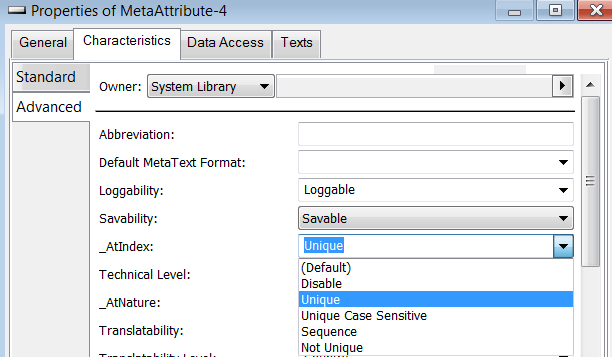 Attribute uniqueness is only effective in repositories created after uniqueness is declared. It is necessary to reorganize existing repositories.
_AtIndex | Comment |
|---|---|
0 | No index |
U | Unique index |
S | Unique and case sensitive index |
N | Non-unique index |
Q | Sequence index |