XPDL export overview
The XML Process Definition Language (XPDL) is a standard format to interchange Business Process definitions between different workflow products such as modeling tools and workflow engines.
The MEGA XPDL export project aims at exporting workflow definitions as XPDL files so that workflows modeled in MEGA can be executed by workflow engines such as FileNet and TIBCO.
Prerequisites
The XPDL export feature is available with MEGA Designer, MEGA Process BPMN and MEGA System BluePrint, and supports XPDL version 2.1.
Scope of XPDL export
The purpose of XPDL export is to translate MEGA Processes into XPDL.
The tool handles translation of the following processes:
• System Processes
• Organizational Processes
• Business Processes
• Functional Processes
The list of supported mappings is detailed below. See Object correspondences.
Exporting XPDL Files
To export an XPDL file from MEGA:
1. In MEGA, select File > Export > XPDL 2.1 (*.xpdl).
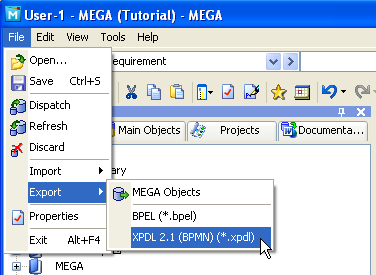
The export dialog box appears.
2. Select the type of object you want to export, for example Organizational Process, and click Next.
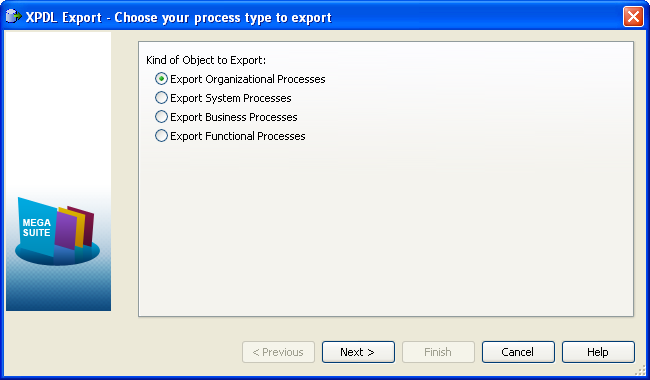
3. Specify the name and path of the file to create, and select the Object to export.
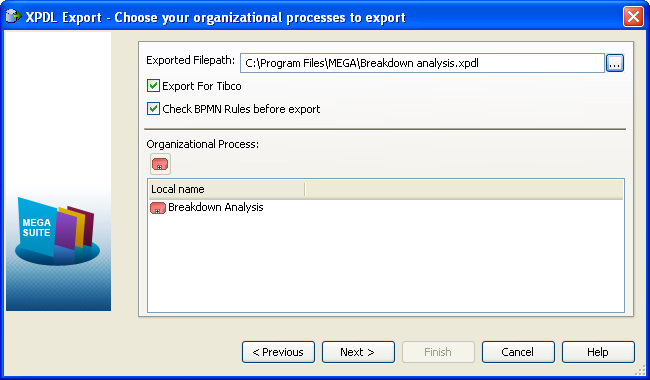
Two options are available:
• Check BPMN Rules before export: this option checks whether processes you want to export conform to BPMN modeling rules. If not, a message asks if you want to continue with the export. Click Yes to continue or No to stop the export.
4. Click Next.
The window that follows shows progression of the export.
5. Click Finish.