StdV-2 Standards Forecast
StdV-2 Description
|
Model
|
Description
|
|---|---|
|
StdV-2 Standards Forecast
|
The description of emerging standards and potential impact on current solution elements, within a set of time frames.
|
For a more detailed description see the DoDAF web site: StdV-2: Standards Forecast.
The purpose of the Standards Forecast model (StdV-2) is to identify emerging, obsolete and fragile standards, and to assess their impact on the architecture and its constituent elements. A forecast that addresses emerging standards gives insight into the direction that the project will take.
StdV-2 Implementation
In the StdV-2 you can select a standard asset catalog and create the object life of each catalog item.
 An object life is the set of time periods representing the current schedule of states for an object.
Specifying object lives for asset catalog items
To create the object life of asset catalog items:
1. Select an asset catalog.
A catalog editor displays in the lower part of the window.
2. Position your cursor at the right end of the interface at the catalog level and click the  sign which appears.
sign which appears.A dialog box appears so that you could create an object life.
3. Select a catalogued asset and the technologies lifecycle.
A lifecycle consists of a state machine.4. Select a start and end date and click OK.
Two different buttons are at your disposal:
• The Add button enables you to create an item below the item selected.
button enables you to create an item below the item selected.• The Insert button enables you to insert an item above the selected item. It inserts an item between the previous item and the one selected, which enables you to create a sequence in lifecycles.
button enables you to insert an item above the selected item. It inserts an item between the previous item and the one selected, which enables you to create a sequence in lifecycles.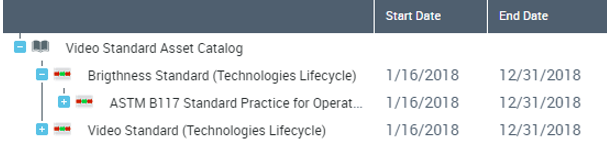
Viewing lifecycles in the form of a Gantt chart
To view the lifecycle in the form of a Gantt chart:
 Click the Open Gantt Chart button in the toolbar
A Gantt chart appears. You can slide the horizontal bar charts of the Gantt diagram to modify dates.