39. Oracle 
39.1. Prerequisite
After installing the HOPEX Discovery module, you must indicate the system where the supplied .dll files that allow connection to the Oracle server are located.
The path to these files must be added to the “PATH” variable in system variables of Windows. The path depends on system version:
32 bit: C:\ProgramData\MEGA\Hopex Application Server\<ClusterName>\.shadowFiles\data.discovery\<Version Number> \Module\Connectors\oracle\32
64 bit: C:\ProgramData\MEGA\Hopex Application Server\<ClusterName>\.shadowFiles\data.discovery\<Version Number>\Module\Connectors\oracle\64
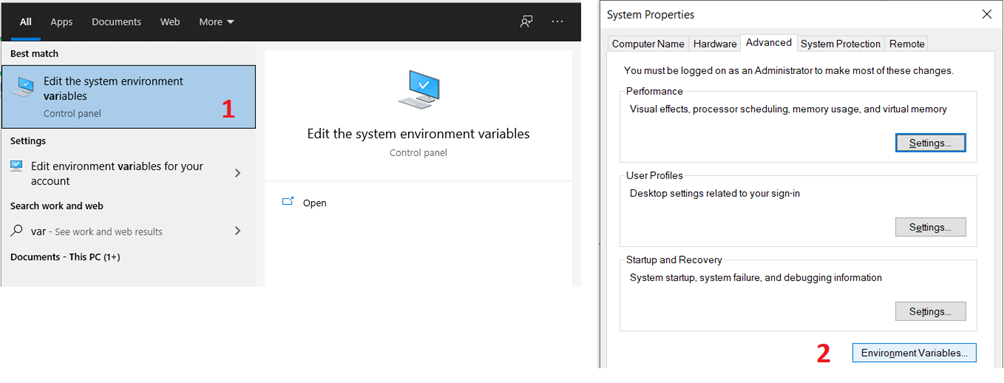
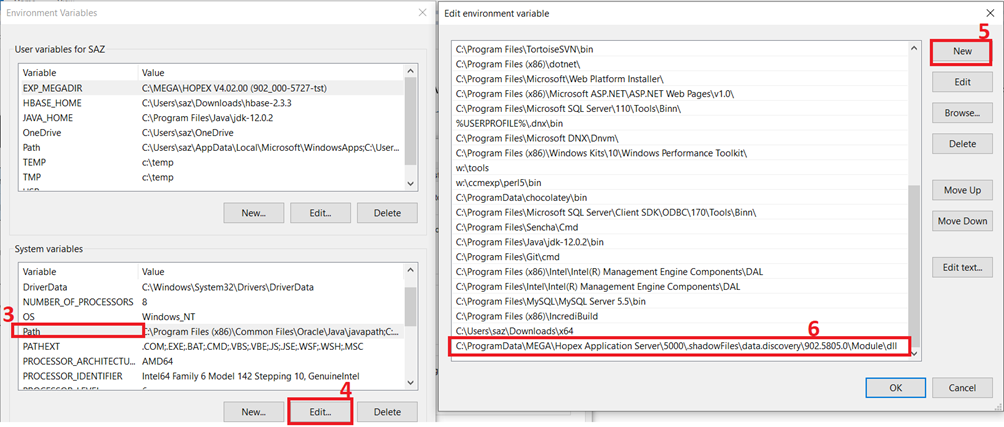
You must restart your computer so that the addition of the .dll directory is taken into account by Windows.
39.2. Oracle OCI Version Support
The driver can connect Oracle Database 11.2 or later.
39.3. Connection Options
39.3.1. Authentication
Property | Description |
Server | The host name or IP of the server hosting the Oracle database. |
Port | The port used to connect to the server hosting the Oracle database. |
ServiceName | The service name of the Oracle database. |
User | The Oracle OCI user account used to authenticate. |
Password | The password used to authenticate the user. |
DataSource | Oracle Net Services Name, Connect Descriptor (known also as TNS Connect String), or an easy connect naming that identifies the database to which to connect. |
39.3.2. Logging
Property | Description |
Logfile | A filepath which designates the name and location of the log file. |
Verbosity | The verbosity level that determines the amount of detail included in the log file. |
LogModules | Core modules to be included in the log file. |
MaxLogFileSize | A string specifying the maximum size in bytes for a log file (for example, 10 MB). |
MaxLogFileCount | A string specifying the maximum file count of log files. |
39.3.3. Schema
Property | Description |
Location | A path to the directory that contains the schema files defining tables, views, and stored procedures. |
BrowsableSchemas | This property restricts the schemas reported to a subset of the available schemas. For example, BrowsableSchemas=SchemaA,SchemaB,SchemaC. |
Tables | This property restricts the tables reported to a subset of the available tables. For example, Tables=TableA,TableB,TableC. |
Views | Restricts the views reported to a subset of the available tables. For example, Views=ViewA,ViewB,ViewC. |
Query meta data for synonyms as they are being the reqular tables. | |
Controls whether table and column descriptions are returned via the platform metadata APIs and sys_tables / sys_views / sys_tablecolumns. | |
Query meta data from DBA_.. system views instead of ALL_.. system views. |
39.3.4. Miscellaneous
Property | Description |
AllowPreparedStatement | Prepare a query statement before its execution. |
BatchSize | The maximum size of each batch operation to submit. |
ConnectionLifeTime | The maximum lifetime of a connection in seconds. Once the time has elapsed, the connection object is disposed. |
ConnectOnOpen | This property species whether to connect to the Oracle OCI when the connection is opened. |
IncludeSynonyms | Query meta data for synonyms as they are being the reqular tables. |
MaxLobSize | The volume in numbers of bytes or UTF-8 chars which is allowed to query by non-parameterized SELECT query. |
MaxRows | Limits the number of rows returned rows when no aggregation or group by is used in the query. This helps avoid performance issues at design time. |
Other | These hidden properties are used only in specific use cases. |
PoolIdleTimeout | The allowed idle time for a connection before it is closed. |
PoolMaxSize | The maximum connections in the pool. |
PoolMinSize | The minimum number of connections in the pool. |
PoolWaitTime | The max seconds to wait for an available connection. |
QueryPassthrough | This option passes the query to the Oracle OCI server as is. |
Readonly | You can use this property to enforce read-only access to Oracle OCI from the provider. |
ReconnectTimeout | The sleep time, in seconds, before retrying to reconnect to the server on a maximum idle time exceeded error. |
ReconnectTries | The number of retry to connect server when a maximum idle time exceeded error is reported by server. |
RTK | The runtime key used for licensing. |
UseConnectionPooling | This property enables connection pooling. |
UseDBAMetadataViews | Query meta data from DBA_.. system views instead of ALL_.. system views. |