Mapping Tables
To map a ServiceNow table with a HOPEX MetaClass:
1. From the Mapping menu, click Add New Mapping.
The Map a table creation page appears.
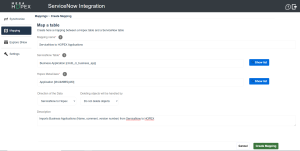
2. Enter a Mapping name.
3. Select a Service Now table and a Hopex MetaClass.
4. Select the direction of the data.
5. Precise whether objects should be preserved or automatically deleted from the target system.
• Do not delete objects is safer but is more likely to lead to duplicates if not used carefully.
• Deleting objects by Hopex or ServiceNow is more likely to lead to data loss, but it ensures greater consistency with the source objects.

6. Enter a Description.
7. Click Create Mapping.
The mapping now appears in the list of mappings.
Deleting or preserving objects from the target system - Examples
Example 1
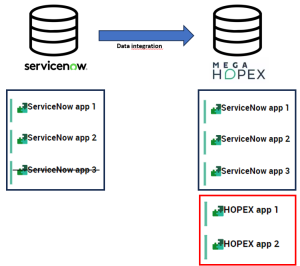
Scenario: Configuring the sync of applications from ServiceNow to HOPEX with no deletion.
Results:
• Any application created or updated in ServiceNow is mirrored in HOPEX.
• Any application deleted in ServiceNow is not deleted in HOPEX.
• Any application created directly in HOPEX is not deleted.
Example 2
Scenario: Configuring the sync of applications from ServiceNow to HOPEX with deletion handled by ServiceNow.
Results:
• Any application created, updated or deleted in ServiceNow is mirrored in HOPEX.
 Any application created in Hopex is deleted at the next sync.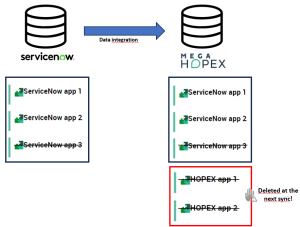
Example 3
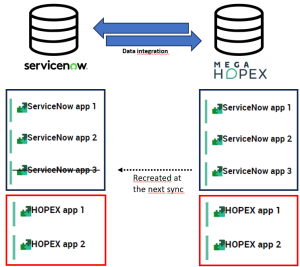
Scenario: configuring bidirectional sync of applications with no deletion.
Results:
• Any application created or updated in ServiceNow is mirrored in HOPEX and vice versa.
• Any application deleted in ServiceNow is not deleted in HOPEX and vice versa – but it is recreated at the next sync (as data integration is bidirectional).
If you need to delete an application, you therefore have to do it in both solutions.