Projects - Roadmap
The Roadmap aspect of the Projects view provides reports dedicated to the Gantt chart for projects.
Accessing the Projects Roadmap
To access the Project RoadMap reports:
1. From the navigation menu, select Projects > RoadMap.
2. Click the Projects Roadmap tab.
3. In the Projects field, select the Project that interests you.
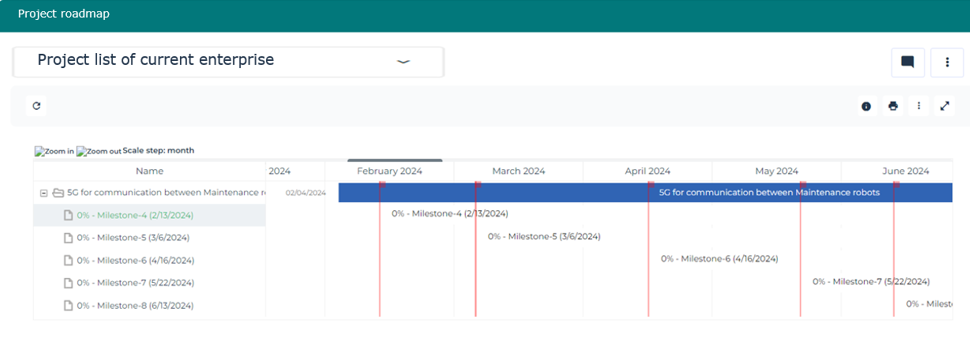
The "Project RoadMap" report is displayed presenting the Gantt chart for projects and the road maps for project deliverables.
The Gantt chart presents one row per project. The following information is provided for each project:
• Start and end dates
• Progress
• Dependencies
• Declared delays
Accessing the Project Portfolios Roadmap
To access the Project Portfolio RoadMap reports
1. From the navigation menu, select Projects > RoadMap.
2. Click the Project Portofolios Roadmap tab.
3. In the Projects Portofolios field, select the Project that interests you.
The "Project Portoflio RoadMap" report is displayed presenting the Gantt chart for Portofolio projects and the road maps for Portofolioproject deliverables.
The following information is displayed for each portfolio:
• The projects included
• The dependencies
• The status of projects
• The project progress
• The dates defined for the project
 See also Follow-up of Ongoing Projects.