Projects - Connectivity
The Connectivity aspect of the Projects view helps management of the dependencies between Projects to ensure that project deliverables are in the available milestones sequence.
Connectivity Matrix
Matrix enabling creation of Project Dependencies between two projects.
 For more information, see: Project dependencies.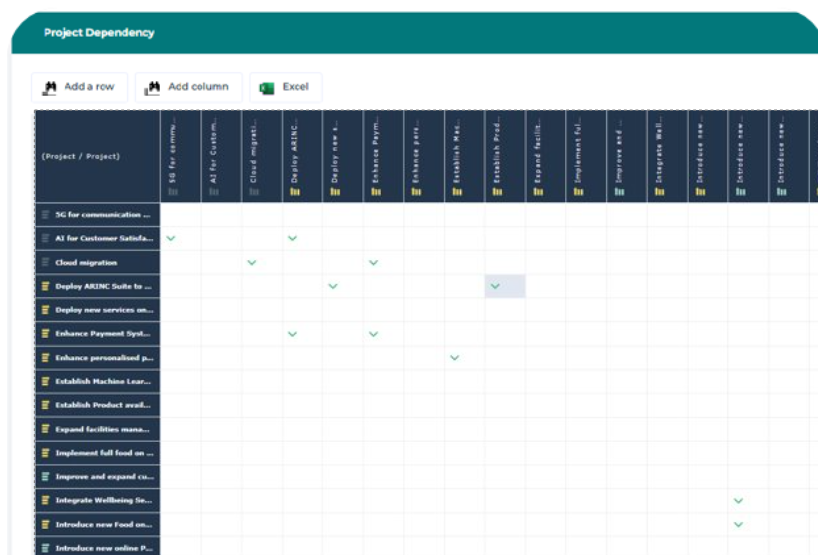
The matrix shows that dependencies exists between projects. You can create a dependency or delete an existing one using this matrix.
To create a Connectivity Matrix:
1. From the navigation menu, select Projects > Connectivity.
2. Select the Connectivity Matrix tab.
The list of existing matrix is displayed.
3. Click the New button.
The new matrix is created.
4. Click the matrix to open it.
5. Use the Add row and Add column butons to add projects in the matrix.
The dependencies are represented by check marks.
6. Click the box between projects to add or delete a dependency.
You can access the dependencies of a projet using the Properties button. See: Project dependenciesConnectivity Reports
The Connectivity Report shows the dependencies of a specific list of projects.
For more information, see Project dependencies.To create a Connectivity Report:
1. From the navigation menu, select Projects > Connectivity.
2. Select the Connectivity Reports tab.
3. Click the New button.
The creation wizard opens.
4. Enter the Name of the report and click Next.
5. Click Connect to select the list of projects that interest you.
6. Click OK.
The Project Dependency report is displayed with the dependencies of the selected projects.