Managing Data Reading Access
Full management of data reading access is only available in HOPEX Administration (Windows Front-End).
Managing data reading access areas is only available after activating the data confidentiality management.
 See Data Reading Access.
The Web Administration desktop enables to:
• display reading access areas
• create reading access areas
• define its upper level area
• define its lower level area
• define its reading access area type
• define its members
• compile the reading access diagram
Accessing Reading Access Areas (Web)
To access reading access areas (Web):
1. Connect to the HOPEX Administration desktop.
2. Click the Data Access > Reading Access areas navigation menu.
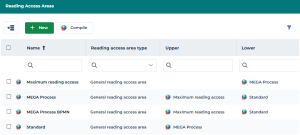
The list of reading access areas displays with, for each area:
• its Reading access area type
• its Upper area
• its Lower area
Compiling the Reading Access Diagram (Web)
Running the reading access diagram compilation ensures consistency of HOPEX behavior with declarations of the diagram.
 If the diagram is not compiled, some users may be able to see objects that are normally hidden.
To compile the reading access diagram (Web):
1. Access the list of reading access areas.
2. In the list menu bar, click Compile.
When compilation is complete, a message indicates that the operation was successful, or, if applicable, that the diagram contains errors.