Appendix: Action Plan Workflows
Two workflows are proposed to manage the different steps of an action plan:
• A Bottom-Up workflow, which corresponds to the case where an action plan is created by any user, for example a processing activity owner. Here the new action plan must be validated by an approver before being implemented.
• A Top-Down workflow, which corresponds to the case where an action plan is created by an "action plan manager", for example the DPO.
Bottom-Up Action Plan Workflow
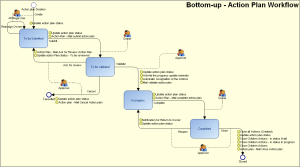
Creating the action plan
When an activity/application owner creates an action plan, the created action plan is in "To be Sent" state.
By default, the action plan creator is the action plan Owner. Having specified the characteristics of a new action plan, the creator can:
• Propose the action plan.
In this case, the user defined as "Approver" receives a notification mail, and the new action plan appears with status "To Begin" in his/her tasks list.
If you changed the name of the approver (which is by default the one who created the action plan), you first need to Reassign the approver from the pop-up menu of the action plan.
Preparing the action plan
The action plan "Approver" user can:
• Validate the action plan, which then takes status ""In Progress". Actions can then be created. For more details, see Managing Actions.
• Cancel the action plan which takes status "Canceled".
Executing the action plan
Having executed actions relating to the action plan, the "Owner" can:
• Terminate the action plan which takes status "Closed". To do this, all action plan actions must be terminated. For more details, see Managing Actions.
The "Approver" user is notified of the action plan termination request.
Closing the action plan
After having consulted action plan follow-up reports, the "Approver" user can:
• Close the action plan, which retains "Closed" status and disappears from the task lists of creator, approver and owner.
• Reopen, for additional actions. The action plan again takes status "In Progress".
Top-down Action Plan Workflow
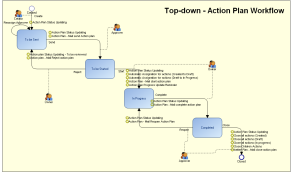
Action Workflow

Notifications are sent by the creator to the responsible user:
• when the action is assigned to a user,
• when the action is closed.