Using the Processing Activity Workflow
A standard workflow enables you to manage the lifecycle of a processing activity.
The chief privacy officer creates the processing activity. He asks the processing activity owner to complete the processing activity description. Once the processing activity has been described, the chief privacy officer can validate it. Then, pre-assessment and eventually DPIAs can be performed.
 For more information on the complete workflow, see What are the possibilities offered by the standard processing activity workflow?
Requesting processing activity description
To send the processing activity:
 Right-click the processing activity and select the following:
The processing activity owner can connect to HOPEX Privacy Management with the corresponding profile and complete the description of the processing activity.
You must have previously selected a processing activity owner in the processing activity property page.Submitting processing activity description
After completing the processing activity description, the processing activity owner can send it to the Privacy team. They will in be able to start pre-assessment based on what the processing activity owner specified.

Submitting pre-assessments and DPIAs
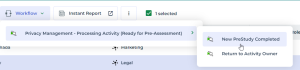
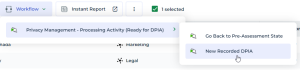
After the activity owner has completed and submitted processing activity description, the Chief Privacy Officer can start assessments (pre-assessments and then DPIAs when needed).
If the description of the processing activity is not entirely satisfactory, a member of the Privacy team might want to return it to the processing activity owner for review.