Managing Policy Documents

Creating Policy Documents
To create policy documents:
 Select Organization > Policies & Procedures.
You may provide the following information when creating a policy document:
• Document name
• Scope: legal entity or department concerned
• Status:
• Existing: the document is available
• Foreseen: it has been considered to provide a policy but it is not available yet
• Not addressed: no document is available
• Ongoing: the document is being written
• Tag: you can associate a tag to the policy so as to be able to retrieve it easily.
 For more information on tags, see Collaboration features.
Attaching Policy Document Information
To attach the document which is important from a privacy perspective:
1. Expand the Attachments section of the policy document created.
2. Attach a Business document or create an External Reference indicating the relevant URL.
Assessing Policy Documents
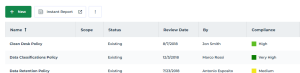
From the list of policy documents you can specify information about the policy document assessment:
• Review Date
• By: who performed the review
• Compliance: the reviewer indicates how effective the document is in relation to the privacy requirements