4. Selecting the data language with the REST API
In HOPEX the data can be entered in different languages (English, French, Spanish, Italian, German...). When connected by the GraphQL REST API it is possible to select the data language.
4.1. Querying data in the current data language
By default all the queries are performed in the current data language.
• The following query returns the name of the application in English:
|
Query
|
Result
|
|
query app {
application {
name
}
}
|
{
"data": {
"application": [
{ "name": "AA" },
{ "name": "Account Management" }
]
}
}
|
• The following query returns the current language:
|
Query
|
Result
|
|
query currentLanguage {
_currentContext {
language
languageId
languageName
}
}
|
{
"data": {
"_currentContext": {
"language": "EN",
"languageId": "00(6wlHmk400",
"languageName": "English"
}
}
}
|
4.2. Querying data in a selected data language
When requesting the data you can force the language of the return data for all translatable fields (e.g.: name, comment). The selection of the language is done by its code (e.g.:EN, DE, JA, FR, ES, NL, IT).
In a query you can get the data in one or multiple languages.
• The following query returns the name of the application in English, French, and Italian. As there can be only one field with name, alias of the name are created. As seen in the example the translation may not be available and an empty string is returned.
|
Query
|
Result
|
|
query app {
application {
name(language:EN)
nameFR:name(language:FR)
nameIT:name(language:IT)
}
}
|
{
"data": {
"application": [
{ "name": "Management", "nameFR": "Management", "nameIT": "" },
{ "name": "Account Payable", "nameFR": "", "nameIT": "" },
{ "name": "Account", "nameFR": "Comptabilité", "nameIT": "Conto" }
]
}
}
|
These requests do not change the default language of the user. Any next query performed without defining the language is returned in the default language.
4.3. Changing the current data language
To change the current data language you need to update the user context: execute a graphQL mutation on the context.
• In the following example the context will be changed to French.
|
Query
|
Result
|
|
mutation updateLanguage {
_updateCurrentContext(
currentContext:{
language:FR
}
)
{ language }
}
|
{
"data": {
"_updateCurrentContext": {
"language": "FR"
}
}
}
|
4.4. Changing the data language for a given user
Aside from the current user it is also possible to update the data language of a group of users.
4.4.1. Query to know the language of a given user
You can query the user to know his/her default language. If the returned value is blank the default language is the same as the installation one.
|
Query
|
Result
|
|
query user {
personSystem(filter:{name:"Thomas"}) {
id
name
dataLanguage {
...on Language {
language:languageCode
}
languageId:id
languageName:name
}
}
}
|
{
"data": {
"personSystem": [
{
"id": "qqcxS(UhHzHC",
"name": "Thomas",
"dataLanguage": {
"language": "EN",
"languageId": "00(6wlHmk400",
"languageName": "English"
}
}
]
}
}
|
4.4.2. Mutation to update the language of a given user
You can set the language of a given user by its ID.
|
Query
|
Result
|
|
mutation updateUser {
updatePersonSystem(
id:"qqcxS(UhHzHC"
idType:INTERNAL
personSystem:{
dataLanguageCode:FR
}
) {
dataLanguage {
...on Language {
language:languageCode
}
languageId:id
languageName:name
} } }
|
|
4.5. Getting the list of available data languages
To know the possible value of the language code available you can query graphQL.
query availableLanguage {
language(filter:{id:"I9o3by0knG00"}) {
language_SpecializedLanguage {
language:languageCode
languageId:id
languageName:name
}
}
}
You may have to do it on the MetaModel schema so that the query can work.
4.6. Adding data languages and seeing them in the API
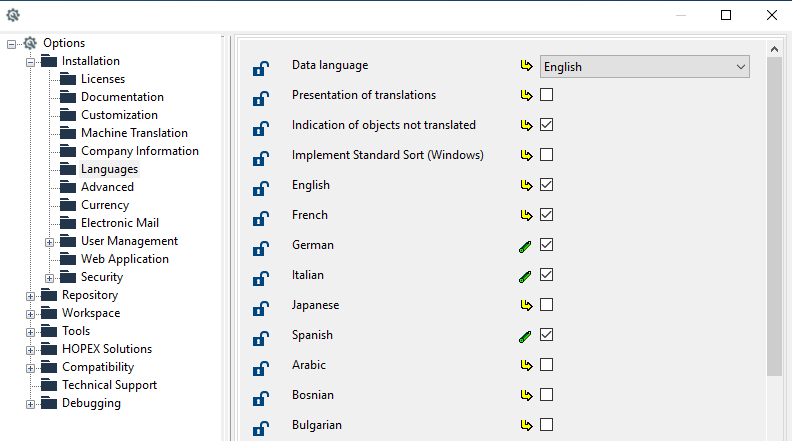
The list of available data languages depends on the options defined in HOPEX.
In the Environment options, check the available languages in the Installation > languages folder: