Report (MS Word) Generation Steps
For each main object type in HOPEX (business process, organizational process, application, database, etc.), one or several report templates (MS Word) are available.
For a process for example, there is a general report template (MS Word), one specific to risk analysis and one specific to process simulation.
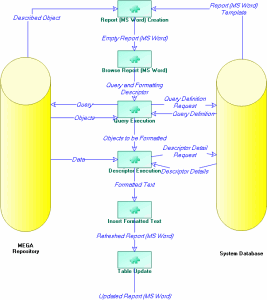
The generation of a report (MS Word) in HOPEX is as follows:
1. HOPEX searches for report templates (MS Word) to be proposed as a function of the type of object to be described and the products available to the user.
2. If several report templates (MS Word) exist, HOPEX asks the user to select the appropriate report template (MS Word).
3. The report (MS Word) is automatically created from a copy of the selected report template (MS Word).
4. HOPEX browses the report (MS Word) to find queries specified in the report template (MS Word).
5. For each query found, the program searches for its definition in the system repository, then executes this in the HOPEX repository.
6. HOPEX formats each query result object using the descriptor specified in the report template (MS Word). This descriptor is found in the system repository.
7. The formatted text is inserted in the report (MS Word).
8. The program processes the next query.
9. When all queries have been processed, the program updates the table of contents and index if these exist.
 Note that for .docx reports generated on HOPEX Web Front-End, the table of contents need to be updated manually.