Using Groups
Reusing an existing group
You can reuse an existing group in your descriptor if this group relates to the same object type.
To reuse an existing group:
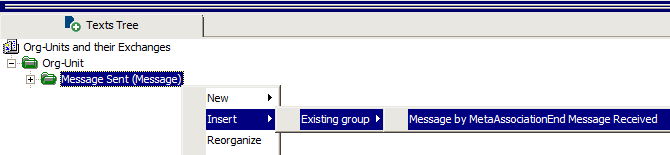
1. Right-click the group that relates to the same object type as the group you want to add and select Insert > Existing Group then the name of the group you want to add.
Groups relating to the same object type are proposed.
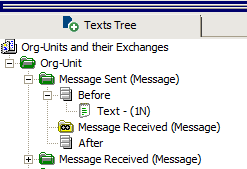
The group connected in this way remains linked to the reference group. An icon is added to the tree structure, but you cannot modify these elements (you can modify the group in which it was initially created).
Deleting a Group
To delete a group:
 Right-click the group and select Delete.
All dependent elements are deleted, except for the connected groups and descriptors, which remain in their initial location.
 When in doubt, you can begin by deleting the texts and then check the results before deleting the entire group.
Modifying a group properties
To modify a group properties:
1. Right-click the group and select Properties.
2. In the group properties you can modify the query.
3. Click OK.