Multiple triggering transitions
Reminder of general case concerning workflow transitions
When a transition has been triggered by a user, the workflow instance passes to the next status.
By default, no other user can now trigger this transition.
Multiple triggering
When the multiple triggering option is activated for a transition, several users can trigger the transition.
When a user triggers multiple triggering, the workflow instance passes to the next status. Workflow status properties enable identification of:
• users who have triggered the transition
• users who have not yet triggered
To activate the multiple triggering option:
1. In the workflow transition properties dialog box, select the Participant tab.
2. Select the Multiple Participation option.
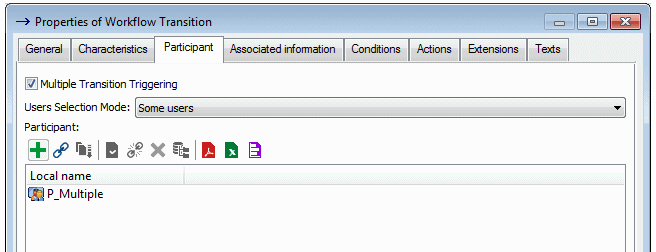
 The multiple transition should not be connected to initial or to final status.
Await user intervention
You can arrange that intervention of users of a multiple transition is mandatory for the workflow to continue and pass to the next status.
To do this:
1. On the workflow transition that follows the multiple transition, implement the macro "Check Multiple Transition Condition".
You can duplicate and customize this macro to indicate for example that at least 50% of users must have intervened to be able to pass to the next workflow status.2. Modify the value by default for the Condition Kind and specify that it is a "Precondition".
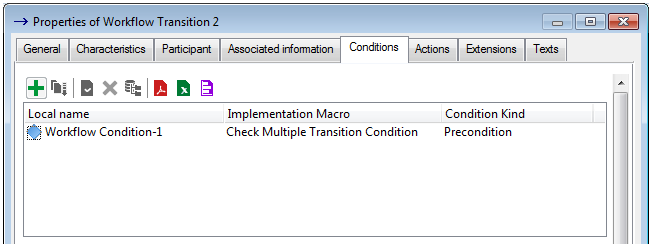
With implementation of this macro, and if all users have not yet intervened, the Next Status command of the workflow definition pop-up menu is grayed for the user authorized to trigger the next workflow.
Viewing users contributing a workflow
To view contributors awaited in the workflow who have not yet triggered a transition:
 In the properties dialog box of the workflow instance, select the Status tab and the Status of Contributors subtab.
You can view in this subtab:
• users who have already participated in the workflow (Performed Contributions frame)
• users whose contribution is awaited preventing workflow progress (Expected Contributors frame)
Progressing the workflow
HOPEX allows to bypass the "Check Multiple Transition Condition" macro and authorizes progress without awaiting intervention of other users.
To continue the workflow despite the fact that some users have not yet triggered a transition:
1. In the properties dialog box of the workflow instance, select the Status tab.
2. In the Status of Contributors subtab, click the Allow the workflow to proceed button.

The Next Status command of the workflow instance is no longer grayed. The workflow can continue. Other contributors no longer intervene in the workflow.