Configuring the workflow transition triggering menu
Workflow subject objects can propose a pop-up menu enabling workflow transition triggering.
 The "Design Task" MetaClass for example has this configuration as standard.
This pop-up menu comprises a set of menus:
• a menu displaying the state of the object
• several sub-menus presenting the list of workflow transitions that the user can trigger
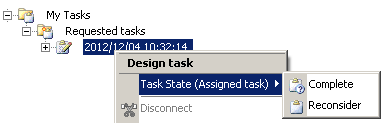
To create a menu enabling triggering of a transition on an object:
1. In the properties dialog box of the MetaClass concerned, select the User Interface tab, Menu Commands subtab.
2. Create a Command and click its name.
3. In the Macro field, associate the "Workflow Subject Command" macro.
4. Configure menu display in the _Parameterization section.
Detailed help is available at the bottom of the properties dialog box after clicking in the configuration area.Naming the menu
The "WorkflowState" key enables menu naming. It can be defined via:
• code templates
• tags [@StatusName@] and [@WorkflowName@].
This configuration enables structuring of all menus in the same way.
WorkflowState = ~8bjDw1bEFTtR[Task State] ([@StatusName@])
Naming the menu for a given workflow definition
The key "WorkflowState%n" enables naming of a menu for a given workflow definition. You must specify the workflow definition.
WorkflowState1 = ~9nWjkOxmE95G[Action Plan Workflow], [@StatusName@]
Associating an image with a workflow transition
To associate an image with a workflow transition:
 With the key "Picture%n", specify a workflow transition and an image.
Picture1 = ~X0O81(okB5S2[Reconsider],~Zimg8ZhWBrn0[Design Task]
Picture2 = ~R3O827okB550[Assign],~(f3u5nUnBvH1[Design Task Assigned]
Hiding the menu of a workflow definition
The key "FilterMode" enables hiding of the menu of a workflow definition. Two values are possible:
• "All"
The value "All" is default behavior. All workflow menus are presented.
• "List"
The value "List" enables display of only those menus associated with the workflow definitions you want to propose. Only those menus for which the key " WorkflowState%n " was specified are presented.
The configuration below enables proposal of only the menu for the "Action Plan Workflow" workflow definition. No menus are proposed for other possible workflows.
WorkflowState1 = ~9nWjkOxmE95G[Action Plan Workflow], [@StatusName@]
FilterMode = List
Hiding the state of the object
The first level in the menu concerns the state of the object. You can choose to hide it and display only the workflow transitions.